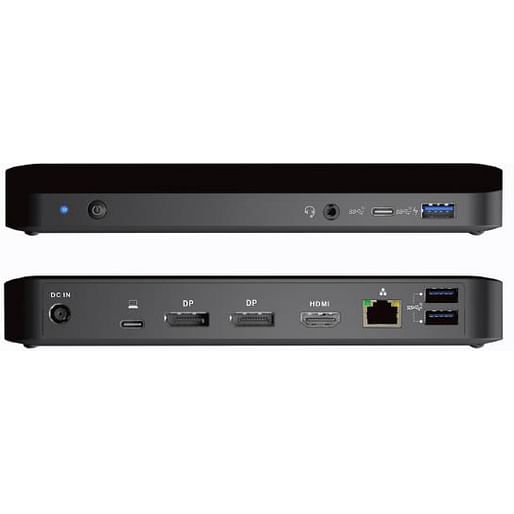
Shintaro Blazer USB-C Triple Display Dock
Item No:
701717
MPN:
SH3PDMST
$218.87
Payment options
Shipping Information
- Unavailable for shipping
- This product is not currently available for purchase
Store Availability
- Unavailable at Bankstown Store
- Unavailable at Castle Hill Store
- Unavailable at Northmead Store
Shintaro Blazer USB-C Triple Display Dock with DP1.4MST technology with 85W PD (USB-C to 2x DP, 1x HDMI, 1x USB-C, 3 x USB-A, RJ-45 GbE)
The Shintaro Blazer SH3PDMSTis a USB-C DP1.4 MST Dock, is the best cost performance docking solution for I/O expansion and extending multiple display. Connect your USB devices with 4 USB ports, its built-in USB3.1 ports to enjoy the super speed data transmission up to 10Gbs between USB peripherals. With Smart Power Management function that ability to deploy power to charge your device from power source.
USB-C MST Dock supports dual 4K monitors with DP1.4 MST technology
Connect your USB devices with 3x USB-A 3.1 Gen 2 (one port supports BC1.2 & Apple charging), 1xUSB-C 3.1 Gen 2
Max. 85W power charging to laptop
Smart power management for power budget saving
3.5mm AUX Speaker and microphone jack
Front facing USB-C 3.1 Gen 2 port
Gigabit Ethernet 10/100/1000Mbps
Front facing power button to switch off docking station
Extended Monitor Application under MST Technology - Utilise Laptop screen plus 2 x 4K displays or Use in triple display mode with no laptop screen in extended mode
| Ports & interfaces | |
| Connectivity technology The technology that enables connectivity of the device, e.g. wired or wireless. | Wired |
| Host interface Interface that enables a host controller to communicate with a driver. | USB 3.2 Gen 1 (3.1 Gen 1) Type-A + Type-C |
| USB 3.2 Gen 1 (3.1 Gen 1) Type-A ports quantity | 3 |
| USB 3.2 Gen 1 (3.1 Gen 1) Type-C ports quantity Number of USB 3.0 (3.1 Gen 1) ports with Type-C connector. USB 3.0 (3.1 Gen 1) is USB interface version which supports transfer rate up to 5 Gbit/s (SuperSpeed). USB Type-C connector has symmetrical design architecture and compatible with Thunderbolt 3 interface. | 1 |
| USB Power Delivery |
 |
| USB Power Delivery up to | 85 W |
| HDMI ports quantity The number of sockets (ports) for HDMI connections. HDMI (High-Definition Multimedia Interface) is a compact audio/video interface for transferring uncompressed video data and compressed/uncompressed digital audio data from a HDMI-compliant device ("the source device") to a compatible computer monitor, video projector, digital television, or digital audio device. HDMI is a digital replacement for existing analog video standards. | 1 |
| HDMI version | 2.0 |
| DisplayPorts quantity Number of DisplayPorts. A DisplayPort is a digital display interface developed by the Video Electronics Standards Association (VESA). The interface is primarily used to connect a video source to a display device such as a computer monitor, though it can also be used to carry audio, USB, and other forms of data. | 2 |
| DisplayPort version | 1.4 |
| Microphone in The socket where a microphone is connected to the device. |
|
| Combo headphone/mic port |
|
| Headphone outputs Number of sockets /ports where headphones are connected. | 1 |
| Headphone connectivity How headphones connect to a device e.g. wirelessly or via a cable and connector. | 3.5 mm |
| DC-in jack The socket/plug where the DC electricity supply connects to the device. |
|
| Network | |
| Ethernet LAN An Ethernet LAN (Local Area Network) interface is present, for a wired conection via a cable. |
|
| Ethernet LAN (RJ-45) ports Number of Ethernet LAN (RJ-45) ports (connecting interfaces) in the device. Ethernet LAN (RJ-45) ports allow a computer to connect to the ethernet. | 1 |
| Ethernet LAN data rates The different speed levels of the Ethernet LAN connection. | 10,100,1000 Mbit/s |
| Performance | |
| Card reader integrated The device includes a card reader e.g. a card reader in the disk bay of a computer or thin client to permit log-on using smart/pin cards. |
|
| HD type Type of supported High Definition (e.g. Full HD, 4K Ultra HD). | 4K Ultra HD |
| Number of displays supported The number of displays that can be used with this product. | 3 |
| Maximum refresh rate | 60 Hz |
| Cable lock slot Holes on the edge of devices through which a cable lock can be passed, so the device can be locked to a desk etc. |
|
| Cable lock slot type | Kensington |
| Product colour The colour e.g. red, blue, green, black, white. | Black |
| On/off switch The button which is pressed to switch the device on or off. |
|
| Charging function |
|
| Power | |
| Power source type What the power source is. | DC |
| AC input voltage The voltage of the AC electricity that is inputted into the product. | 20 V |
| Input current | 5 A |
| Operational conditions | |
| Operating temperature (T-T) The minimum and maximum temperatures at which the product can be safely operated. | 0 - 35 °C |
| Storage temperature (T-T) The minimum and maximum temperatures at which the product can be safely stored. | -20 - 70 °C |
| Weight & dimensions | |
| Width The measurement or extent of something from side to side. | 190 mm |
| Depth The distance from the front to the back of something. | 85.3 mm |
| Height The measurement of the product from head to foot or from base to top. | 26.7 mm |
| Packaging data | |
| Quantity per pack | 1 pc(s) |
| Packaging content | |
| AC adapter included |
|
| SKU | 701717 |
| MPN | SH3PDMST |
| Assembled to Order | No |
| Brand | Shintaro |
| Shipping Latency | None |
| Display In Stock In Frontend | No |
| Product Condition | Brand New/Unused |
| Stock Availability | Available for Shipping |
| Product Use | General |
| Warranty Period | 1 Year Warranty |
| Warranty Contact | http://www.shintaro.com.au/ |