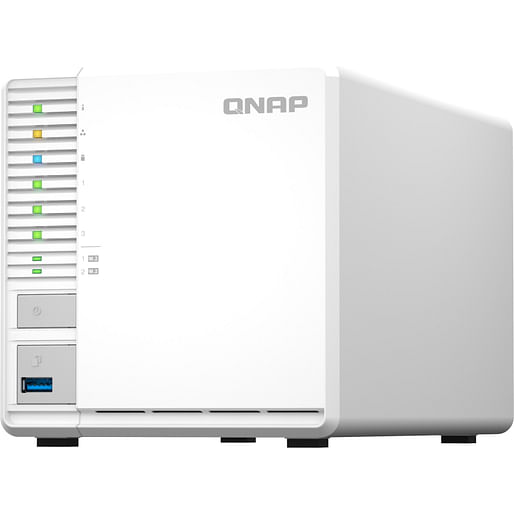
QNAP 3-Bay Celeron N5105/N5095 Quad-Core 8GB RAM Tower NAS
Item No:
710918
MPN:
TS-364-8G
$1,017.87
Payment options
Shipping Information
- Unavailable for shipping
- This product is not currently available for purchase
Store Availability
- Unavailable at Bankstown Store
- Unavailable at Castle Hill Store
- Unavailable at Northmead Store
QNAP TS 364, NAS, Tower, Intel Celeron , N5095, White
The 3 bay TS 364 not only allows you to enjoy the higher performance and data protection of RAID 5 using the fewest number of disks, but also features M.2 SSD slots and efficient auto tiered storage to realize optimal system performance. The TS 364 supports up to 16GB RAM and has a 2.5GbE port to enhance daily use and to run compact virtual machines and containers. Home users can also enjoy the multimedia portal capabilities of the TS 364 for streaming and sharing photos, music, and videos to all their devices.
Quad core high performance
The TS 364 is designed for homes and small offices, allowing you to effortlessly manage files and enjoy multimedia entertainment while also providing reliable data protection. It uses an Intel Celeron N5095 quad core processor (burst up to 2.9 GHz), has 3.5 inch SATA 3Gb/s and 6Gb/s drive bays, supports up to 16GB RAM, and AES 256 bit encryption (for both full NAS volumes and shared folders) protects the confidentiality of sensitive data without compromising performance.
Elegant appearance
Effective airflow
The TS 364 sports a stylish and elegant look with an industrial design concept. Effective airflow provides better cooling, ensuring smooth performance even under the heaviest loads.
Easy hard drive installation
The tool less 3.5 inch hard drive installation allows easier system setup and maintenance, while the front panel LEDs assist in viewing system status.
Accelerate AI "powered image recognition and caching with TPU and PCIe expansion
The TS 364 is equipped with two M.2 PCIe Gen3 slots, enabling cache acceleration or SSD storage pools for improved performance, or Edge TPU for AI image recognition.
NVMe 2 SSDs for cache acceleration or efficient tiered storage
The TS 364 supports SSD caching and features two M.2 slots that support M.2 PCIe NVMe SSDs with 2280 form factors (sold separately) for boosting overall NAS performance. Qtier technology can also be used to empower the TS 364 with auto tiering that helps continuously optimize storage efficiency across all installed storage devices.
Accelerate AI "powered image recognition with TPU
By leveraging a Google Edge TPU to QNAP AI Core (the AI powered engine for image recognition), the TS 364 can perform high speed face and object recognition. Google Edge TPU enables QuMagie to quickly process thousands of photos with high speed AI Image recognition and classification, and QVR Face to analyze real time video for instant facial recognition.
Enjoy optimized SSD performance with extra over provisioning
As SSD prices continue to become more affordable for home and small business users, there s never been a better time for using SSDs in your NAS! With high speed and ultra low latency, SSDs make everyday NAS use faster, more responsive, and enable faster backup, smoother multimedia, and optimized virtualization. QTS takes SSD functionality even further by supporting software defined SSD RAID extra over provisioning (OP), enabling you to allocate additional OP space (up to 60%) to optimize SSD random write speeds and lifespan. By using SSD OP, even affordable consumer grade SSDs can attain performance and endurance levels similar to enterprise grade SSDs.
Build a High Speed 2.5GbE Network Environment
QNAP offers comprehensive, budget friendly storage and networking solutions that provide an array of connectivity possibilities. Easily and flexibly upgrade your workplace or home network now to handle bandwidth hungry applications.
TS 364
Featuring a 2.5GbE port, the TS 364 is futureproofed for high speed networking.
Upgrade computers and servers
Servers and desktops can install PCIe QNAP network cards that support 10G/5G/2.5G/1G/100M Multi Gig.
Add a 5GbE port to laptops
Laptops and upgrade limited computers can use QNAP s portable USB 3.2 Gen 1 to 5GbE adapter for connecting to 5G/2.5G/1G/100M networks.
A 2.5GbE switch
QNAP s 10GbE/NBASE T switches support 10G/5G/2.5G/1G/100M and allow connecting multiple workstations and devices for high speed collaboration in device dense environments.
Enhance productivity with multiple USB ports
With two USB 3.2 Gen 2 (10Gbps) ports and one USB 3.2 Gen 1 (5Gbps) ports, you can quickly backup and transfer large files to/from the TS 364. You can also connect mobile phones, UPS, and other compatible USB devices for greater functionality and application potential.
Faster image identification with integrated Intel OpenVINO AI engine.
With integrated Intel OpenVINO AI computing resources, the TS 364 accelerates AI image recognition performance without impacting other applications or services. QNAP AI Core primarily works with the QuMagie application.
QuMagie photo management
Easy to use photo management solution that integrates AI image recognition and intelligent classification for your collection.
QTS 5, Fast, smooth, and easy to use!
The TS 364 comes with the QTS 5 operating system as standard, providing a next generation usage experience with an updated system kernel, optimized user interface, and advanced security features.
Brighter. Smoother. You ll like it.
When navigating QTS 5, you will notice a finer attention to detail for a superior browsing experience. Enjoy a smoother NAS experience, comfortable visual design, and find your favorite apps quicker.
Get started with the notice board
When performing first time installation, the notice board guides you through the setup process. Simply follow the step by step instructions for a quick and easy setup.
Smooth and reactive user interface
Whether clicking buttons, switching between apps, expanding/collapsing windows " every action is much smoother. The search bar in the main menu also assists in quickly finding desired apps.
Video Conferencing System and Wireless Presentation for Enterprise
The TS 364 can be used with QNAP KoiMeeter to build a high quality video conferencing system. With 4K output you can see every detail in screen shares, web browsers, and online meetings. Important files can be shared using the built in chat room and video calls and messages can be recorded to the TS 364 for future playback or archiving.
An easy to use, all in one backup solution
The TS 364 can do many things, but at its heart is a complete backup solution to protect your files and data. By regularly backing up your files and device content, you can make data loss a thing of the past.
Back up Windows /Mac files
For Windows , install NetBak Replicator to back up your PC to the TS 364. In macOS , simply set up the built in Time Machine to back up files to NAS.
Back up photos on mobile devices
Install Qfile or QuMagie mobile app and enable the auto upload function. Photos will be automatically uploaded to your TS 364 as soon as they are taken.
Back up USB drives & external hard drives
Simply plug in the storage device to the front USB port of the TS 364 and press the One Touch Copy button to back up all files to the NAS.
Back up Google Drive
Hybrid Backup Sync can safely back up files and data from Google Drive to the TS 364, helping you save money on cloud storage costs.
Back up NAS files to the cloud
Hybrid Backup Sync supports all your favorite public cloud services, allowing you to effortlessly back up or sync NAS files to cloud storage.
QuDedup technology
Hybrid Backup Sync eliminates redundant data at the source and then backs up the deduplicated data, helping to save time and storage costs while providing efficient multi version backups.
Back up NAS files to remote sites
With Hybrid Backup Sync, you can easily backup or sync files and data from the TS 364 to a remote QNAP NAS or server for multiplied data protection.
Protect your data from ransomware threats with Snapshots
Snapshots are an advanced backup method and are normally reserved for high end business NAS. QNAP provides snapshots as standard for all NAS " including the TS 364. Snapshots work by recording the current state of the system, allowing it to be restored back this state at any time greatly helping in mitigating the threat of ransomware.
Back up PCs to your NAS
Always remember to back up! You should routinely (or automatically) back up files and data from your computer to your TS 364.
Take snapshots within seconds
Instantly take snapshots to record the current state of your system and data. You can quickly restore files and data to a previously recorded state by selecting a snapshot version from a specific time point.
Back up snapshots
Multiply data protection by backing up snapshot files! Replicate snapshots in the TS 364 to a remote NAS (Snapshot Replica) and only copy the changes made. This helps save time & bandwidth, and can be run manually or on a scheduled basis.
Restore data using snapshots
Snapshot content can be quickly restored to a local NAS, or restored on a folder/file basis to a local/remote NAS or cloud storage. You can also conveniently view and restore snapshots from the client side.
The best storage for your high resolution multimedia files
High resolution RAW files eat up phone storage so quickly. Whether you are a photographer enthusiastic, YouTuber, or professional photo/video editors, use the TS 364 with high capacity hard drives to alleviate your storage anxiety and organize files efficiently as the best storage center.
RAID protection
RAID redundancy protects data against hard drive failure. By dedicating some drives to redundancy, if a drive fails you can simply replace it with a new drive and avoid data loss.
Storage for massive photos
The AI powered QuMagie with intelligent face and object recognition brings you the ultimate photo management and sharing solution. Includes timeline scrolling, customizable folder covers, iOS Live Photo display, a powerful search tool, and more.
Storage for music collections
Use Music Station to collect and play lossless music, sing along with lyrics, and share albums, playlists or folders with friends and family. You can also put tons of music right in your pocket using the Qmusic mobile app.
Store high resolution videos
Centrally collect GoPro diaries, videos of your family, friends, and pets in Video Station, and easily share your favorites. Take all your videos with you on your mobile devices using the Qvideo mobile app.
Stream all your media to every device in the house
The TS 364 is a complete multimedia center, allowing fast and easy streaming for photos, music and video to TVs, computers and mobile devices.
Plex multimedia streaming
By installing Plex Media Server from the App Center, you can stream media files stored on the TS 364 to mobiles and media streaming devices (including DLNA , Roku , Amazon Fire TV and Google Chromecast ).
Roon music center
Designed for music lovers, Roon allows you to manage a music database in the TS 364 and integrate into Roon s database. Install Roon Server from App Center, run Roon s database on SSD storage, then sit back to enjoy high quality streaming.
Stream to Android TV or Apple TV
Qmedia is QNAP s exclusive streaming app, allowing streaming audio, photos, and videos from the TS 364 to Android TV , Apple TV (via Qmedia) or set top boxes.
Connect to a TV or Monitor with HDMI
With HDMI output, the TS 364 allows you to directly enjoy multimedia content, use web browsers, manage your NAS, or watch recorded surveillance footage or live feeds on your NAS.
HybridDesk Station
Your TS 364 not only provides storage for your multimedia, but it can also be used as a Home Theater PC! Connect the TS 364 to an TV or A/V Receiver with HDMI, install HybridDesk Station, and easily watch movies or play music using the free QNAP remote control or the Qremote mobile app.
Inclusive rich apps
Besides the HD player that centrally manages all the multimedia in your NAS with an easy to use interface, HybridDesk Station also integrates Skype , Facebook , Spotify , LibreOffice , and more apps for you to use right away.
Use your NAS as a PC
Simply connect a keyboard, mouse, and HDMI display to the TS 364 to use it as a PC directly accessing your NAS files and services, and browsing the Internet with Google Chrome and Firefox are just that easy.
Use QNAP Virtual Machine (QVM) Desk
Virtual machines set up in Virtualization Station can also be directly used on an HDMI display through QVM Desk. You can flexibly switch to different virtual machines as you have multiple mini PCs.
Tips for a more productive workday
With a wide range of awesome apps, you can easily access files from various devices, instantly synchronize files with friends or colleague s devices, quickly find specific files, and automatically organize your documents and media files. You can also map the TS 364 s shared folders as network drives on your computers, making accessing NAS files easy and intuitive. The TS 364 helps you save time while being more efficient and productive.
File Station
Easily manage files stored in your TS 364 using the web based File Station. The Qfile companion mobile app also puts all your files at your fingertips, providing a complete personal cloud service that is accessible from anywhere!
Qsync
Qsync is a perfect replacement of Dropbox , allowing you to synchronize files with computers and mobile devices belonging to your family, friends, colleagues, and clients.
Qsirch
QNAP s powerful, Google like search tool helps you quickly find images, music, videos, documents, and emails by keywords, color, and more search conditions.
Qfiling
Save time organizing and archiving your files with Qfiling. Simply categorize your files, set a schedule, and Qfiling will automatically organize and archive them.
Access your NAS from anywhere
The myQNAPcloud service enables quick and easy remote access to your TS 364, allowing you to be always connected without needing to configure complex network settings. With myQNAPcloud Link you are provided with a unique domain name for your TS 364, and will automatically connect using the best method based on your network environment.
Protect your data with higher security
The TS 364 provides advanced privacy and security settings but is easy to set up and use. Besides IP blocking and HTTPS connectivity, there are more apps that help ensure an optimal level of NAS protection against threats like malware and hackers.
2 step verification
When activated, anyone who logs in to the TS 364 must enter a one time verification code after their username and password.
Advanced folder permissions
Easily manage folder permissions, specifying read, read/write, and deny access of individual users to each folder and subfolder.
QuFirewall protection
Supports IPv6, firewall access lists, and GeoIP filtering to restrict access based on geographical locations for higher NAS network security.
Security Counselor
A security portal for the TS 364 to check for weaknesses and offer recommendations for enhancing NAS security. It also integrates anti virus and anti malware scanning software.
Host container applications
If you are curious about Docker or are a hobbyist developer, Container Station on the TS 364 integrates Docker , LXD, and Kata Containers lightweight virtualization technologies, allowing you to run all kinds of self contained applications. You can download apps from the built in Docker Hub , including popular and fully configured applications, and deploy them with just one click. From smart homes to multimedia applications, you can explore your creativity and bring containerized applications to life.
Besides Container Station, more apps (including tools for backup/sync, content management, communications, download, and entertainment) are available from the App Center. Simply click and install on demand to further extend the functionality of your TS 364.
Easily build a wallet friendly home surveillance system!
With the subscription based QVR Elite smart surveillance solution you only pay for the channel licenses you need, allowing you to affordably safeguard your property. You can arrange a dedicated, independent storage space for surveillance data on the TS 364 and enjoy simplified camera management, storage space allocation, camera live viewing and playback. Recordings are saved as MP4 files for playback on nearly every device. You can also use USB webcams as network cameras with the QUSBCam2 app, and remotely monitor your surveillance feeds at any time with the QVR Pro Client companion mobile app.
Flexible and economical storage expansion
QNAP provides easy and affordable solutions to expand your NAS storage capacity.
Attach QNAP expansion enclosures
Connect expansion enclosures to the TS 364, and manage NAS storage expansion with the user friendly Storage & Snapshots Manager app.
Mount cloud storage or remote file servers
Mount cloud storage or remote file servers to expand the capacity of the TS 364 while also centrally managing files on the NAS, cloud storage, and remote devices.
Migrate to a new NAS
Install your NAS hard drives into a larger QNAP NAS and retain all your existing data and configurations.
Upgrade RAID capacity
Hot swap lower capacity drives with larger capacity drives to expand your NAS capacity so it can grow with your files and multimedia collections.
More productivity boosting applications
The TS 364 provides an App Center that includes feature rich apps to expand your NAS potential!
QmailAgent
The best email backup solution that allows you to easily backup/recover and manage multiple email accounts in their native format with strong security and data integrity.
Qcontactz
Centrally manage all your contacts, import contacts from Google , import/export contact information using CSV or vCard files, and enjoy an always online database of contact information.
Qmiix
An Integration Platform as a Service (iPaaS) solution that enables you to connect apps and devices with QNAP NAS for automating daily tasks for greater productivity.
Notification Center
Consolidates all system events, alerts, and notifications for smooth and easy NAS management, keeping you always informed of your NAS status.
QuObjects
Run a high performance S3 compatible development environment on your TS 364 to simplify service development workflows from testing to production. You can also move cold data from the cloud to an on premises QuObjects to save cloud storage costs.
Browser Station
Remotely access protected data on the same LAN as the TS 364 without going through complex VPN settings.
Proxy Server
By using the TS 364 as a proxy server, online resources can be efficiently accessed with greater cost savings and productivity, while network security is also enhanced at the same time.
QuFTP
The TS 364 can perform as an FTP server featuring SSL/TLS encryption, QoS bandwidth controls, and permission settings for efficiently and securely transferring large amounts of data. FTP Client is also supported.
A health check for your hard drives
Hard drives are at the heart of your NAS, and ensuring their long term health and reliability is absolutely crucial. QNAP provides various methods and tools to help you monitor hard drive health, ensuring that you can take proactive decisions to safeguard your data and files.
S.M.A.R.T. and back block scanning
If any of the S.M.A.R.T. values are reported as abnormal, or bad blocks are detected, you can take early action and replace drives before potential data loss occurs.
DA Drive Analyzer
The DA Drive Analyzer leverages ULINK cloud based AI to predict the expected lifespan of drives, assisting you in planning future drive replacements to protect against NAS downtime and data loss.
Seagate IronWolf Health Management
When using supported IronWolf or IronWolf Pro hard drives, overall system reliability is improved by providing you with actionable prevention, intervention, and recovery options.
Quad core high performance
The TS 364 is designed for homes and small offices, allowing you to effortlessly manage files and enjoy multimedia entertainment while also providing reliable data protection. It uses an Intel Celeron N5095 quad core processor (burst up to 2.9 GHz), has 3.5 inch SATA 3Gb/s and 6Gb/s drive bays, supports up to 16GB RAM, and AES 256 bit encryption (for both full NAS volumes and shared folders) protects the confidentiality of sensitive data without compromising performance.
Elegant appearance
Effective airflow
The TS 364 sports a stylish and elegant look with an industrial design concept. Effective airflow provides better cooling, ensuring smooth performance even under the heaviest loads.
Easy hard drive installation
The tool less 3.5 inch hard drive installation allows easier system setup and maintenance, while the front panel LEDs assist in viewing system status.
Accelerate AI "powered image recognition and caching with TPU and PCIe expansion
The TS 364 is equipped with two M.2 PCIe Gen3 slots, enabling cache acceleration or SSD storage pools for improved performance, or Edge TPU for AI image recognition.
NVMe 2 SSDs for cache acceleration or efficient tiered storage
The TS 364 supports SSD caching and features two M.2 slots that support M.2 PCIe NVMe SSDs with 2280 form factors (sold separately) for boosting overall NAS performance. Qtier technology can also be used to empower the TS 364 with auto tiering that helps continuously optimize storage efficiency across all installed storage devices.
Accelerate AI "powered image recognition with TPU
By leveraging a Google Edge TPU to QNAP AI Core (the AI powered engine for image recognition), the TS 364 can perform high speed face and object recognition. Google Edge TPU enables QuMagie to quickly process thousands of photos with high speed AI Image recognition and classification, and QVR Face to analyze real time video for instant facial recognition.
Enjoy optimized SSD performance with extra over provisioning
As SSD prices continue to become more affordable for home and small business users, there s never been a better time for using SSDs in your NAS! With high speed and ultra low latency, SSDs make everyday NAS use faster, more responsive, and enable faster backup, smoother multimedia, and optimized virtualization. QTS takes SSD functionality even further by supporting software defined SSD RAID extra over provisioning (OP), enabling you to allocate additional OP space (up to 60%) to optimize SSD random write speeds and lifespan. By using SSD OP, even affordable consumer grade SSDs can attain performance and endurance levels similar to enterprise grade SSDs.
Build a High Speed 2.5GbE Network Environment
QNAP offers comprehensive, budget friendly storage and networking solutions that provide an array of connectivity possibilities. Easily and flexibly upgrade your workplace or home network now to handle bandwidth hungry applications.
TS 364
Featuring a 2.5GbE port, the TS 364 is futureproofed for high speed networking.
Upgrade computers and servers
Servers and desktops can install PCIe QNAP network cards that support 10G/5G/2.5G/1G/100M Multi Gig.
Add a 5GbE port to laptops
Laptops and upgrade limited computers can use QNAP s portable USB 3.2 Gen 1 to 5GbE adapter for connecting to 5G/2.5G/1G/100M networks.
A 2.5GbE switch
QNAP s 10GbE/NBASE T switches support 10G/5G/2.5G/1G/100M and allow connecting multiple workstations and devices for high speed collaboration in device dense environments.
Enhance productivity with multiple USB ports
With two USB 3.2 Gen 2 (10Gbps) ports and one USB 3.2 Gen 1 (5Gbps) ports, you can quickly backup and transfer large files to/from the TS 364. You can also connect mobile phones, UPS, and other compatible USB devices for greater functionality and application potential.
Faster image identification with integrated Intel OpenVINO AI engine.
With integrated Intel OpenVINO AI computing resources, the TS 364 accelerates AI image recognition performance without impacting other applications or services. QNAP AI Core primarily works with the QuMagie application.
QuMagie photo management
Easy to use photo management solution that integrates AI image recognition and intelligent classification for your collection.
QTS 5, Fast, smooth, and easy to use!
The TS 364 comes with the QTS 5 operating system as standard, providing a next generation usage experience with an updated system kernel, optimized user interface, and advanced security features.
Brighter. Smoother. You ll like it.
When navigating QTS 5, you will notice a finer attention to detail for a superior browsing experience. Enjoy a smoother NAS experience, comfortable visual design, and find your favorite apps quicker.
Get started with the notice board
When performing first time installation, the notice board guides you through the setup process. Simply follow the step by step instructions for a quick and easy setup.
Smooth and reactive user interface
Whether clicking buttons, switching between apps, expanding/collapsing windows " every action is much smoother. The search bar in the main menu also assists in quickly finding desired apps.
Video Conferencing System and Wireless Presentation for Enterprise
The TS 364 can be used with QNAP KoiMeeter to build a high quality video conferencing system. With 4K output you can see every detail in screen shares, web browsers, and online meetings. Important files can be shared using the built in chat room and video calls and messages can be recorded to the TS 364 for future playback or archiving.
An easy to use, all in one backup solution
The TS 364 can do many things, but at its heart is a complete backup solution to protect your files and data. By regularly backing up your files and device content, you can make data loss a thing of the past.
Back up Windows /Mac files
For Windows , install NetBak Replicator to back up your PC to the TS 364. In macOS , simply set up the built in Time Machine to back up files to NAS.
Back up photos on mobile devices
Install Qfile or QuMagie mobile app and enable the auto upload function. Photos will be automatically uploaded to your TS 364 as soon as they are taken.
Back up USB drives & external hard drives
Simply plug in the storage device to the front USB port of the TS 364 and press the One Touch Copy button to back up all files to the NAS.
Back up Google Drive
Hybrid Backup Sync can safely back up files and data from Google Drive to the TS 364, helping you save money on cloud storage costs.
Back up NAS files to the cloud
Hybrid Backup Sync supports all your favorite public cloud services, allowing you to effortlessly back up or sync NAS files to cloud storage.
QuDedup technology
Hybrid Backup Sync eliminates redundant data at the source and then backs up the deduplicated data, helping to save time and storage costs while providing efficient multi version backups.
Back up NAS files to remote sites
With Hybrid Backup Sync, you can easily backup or sync files and data from the TS 364 to a remote QNAP NAS or server for multiplied data protection.
Protect your data from ransomware threats with Snapshots
Snapshots are an advanced backup method and are normally reserved for high end business NAS. QNAP provides snapshots as standard for all NAS " including the TS 364. Snapshots work by recording the current state of the system, allowing it to be restored back this state at any time greatly helping in mitigating the threat of ransomware.
Back up PCs to your NAS
Always remember to back up! You should routinely (or automatically) back up files and data from your computer to your TS 364.
Take snapshots within seconds
Instantly take snapshots to record the current state of your system and data. You can quickly restore files and data to a previously recorded state by selecting a snapshot version from a specific time point.
Back up snapshots
Multiply data protection by backing up snapshot files! Replicate snapshots in the TS 364 to a remote NAS (Snapshot Replica) and only copy the changes made. This helps save time & bandwidth, and can be run manually or on a scheduled basis.
Restore data using snapshots
Snapshot content can be quickly restored to a local NAS, or restored on a folder/file basis to a local/remote NAS or cloud storage. You can also conveniently view and restore snapshots from the client side.
The best storage for your high resolution multimedia files
High resolution RAW files eat up phone storage so quickly. Whether you are a photographer enthusiastic, YouTuber, or professional photo/video editors, use the TS 364 with high capacity hard drives to alleviate your storage anxiety and organize files efficiently as the best storage center.
RAID protection
RAID redundancy protects data against hard drive failure. By dedicating some drives to redundancy, if a drive fails you can simply replace it with a new drive and avoid data loss.
Storage for massive photos
The AI powered QuMagie with intelligent face and object recognition brings you the ultimate photo management and sharing solution. Includes timeline scrolling, customizable folder covers, iOS Live Photo display, a powerful search tool, and more.
Storage for music collections
Use Music Station to collect and play lossless music, sing along with lyrics, and share albums, playlists or folders with friends and family. You can also put tons of music right in your pocket using the Qmusic mobile app.
Store high resolution videos
Centrally collect GoPro diaries, videos of your family, friends, and pets in Video Station, and easily share your favorites. Take all your videos with you on your mobile devices using the Qvideo mobile app.
Stream all your media to every device in the house
The TS 364 is a complete multimedia center, allowing fast and easy streaming for photos, music and video to TVs, computers and mobile devices.
Plex multimedia streaming
By installing Plex Media Server from the App Center, you can stream media files stored on the TS 364 to mobiles and media streaming devices (including DLNA , Roku , Amazon Fire TV and Google Chromecast ).
Roon music center
Designed for music lovers, Roon allows you to manage a music database in the TS 364 and integrate into Roon s database. Install Roon Server from App Center, run Roon s database on SSD storage, then sit back to enjoy high quality streaming.
Stream to Android TV or Apple TV
Qmedia is QNAP s exclusive streaming app, allowing streaming audio, photos, and videos from the TS 364 to Android TV , Apple TV (via Qmedia) or set top boxes.
Connect to a TV or Monitor with HDMI
With HDMI output, the TS 364 allows you to directly enjoy multimedia content, use web browsers, manage your NAS, or watch recorded surveillance footage or live feeds on your NAS.
HybridDesk Station
Your TS 364 not only provides storage for your multimedia, but it can also be used as a Home Theater PC! Connect the TS 364 to an TV or A/V Receiver with HDMI, install HybridDesk Station, and easily watch movies or play music using the free QNAP remote control or the Qremote mobile app.
Inclusive rich apps
Besides the HD player that centrally manages all the multimedia in your NAS with an easy to use interface, HybridDesk Station also integrates Skype , Facebook , Spotify , LibreOffice , and more apps for you to use right away.
Use your NAS as a PC
Simply connect a keyboard, mouse, and HDMI display to the TS 364 to use it as a PC directly accessing your NAS files and services, and browsing the Internet with Google Chrome and Firefox are just that easy.
Use QNAP Virtual Machine (QVM) Desk
Virtual machines set up in Virtualization Station can also be directly used on an HDMI display through QVM Desk. You can flexibly switch to different virtual machines as you have multiple mini PCs.
Tips for a more productive workday
With a wide range of awesome apps, you can easily access files from various devices, instantly synchronize files with friends or colleague s devices, quickly find specific files, and automatically organize your documents and media files. You can also map the TS 364 s shared folders as network drives on your computers, making accessing NAS files easy and intuitive. The TS 364 helps you save time while being more efficient and productive.
File Station
Easily manage files stored in your TS 364 using the web based File Station. The Qfile companion mobile app also puts all your files at your fingertips, providing a complete personal cloud service that is accessible from anywhere!
Qsync
Qsync is a perfect replacement of Dropbox , allowing you to synchronize files with computers and mobile devices belonging to your family, friends, colleagues, and clients.
Qsirch
QNAP s powerful, Google like search tool helps you quickly find images, music, videos, documents, and emails by keywords, color, and more search conditions.
Qfiling
Save time organizing and archiving your files with Qfiling. Simply categorize your files, set a schedule, and Qfiling will automatically organize and archive them.
Access your NAS from anywhere
The myQNAPcloud service enables quick and easy remote access to your TS 364, allowing you to be always connected without needing to configure complex network settings. With myQNAPcloud Link you are provided with a unique domain name for your TS 364, and will automatically connect using the best method based on your network environment.
Protect your data with higher security
The TS 364 provides advanced privacy and security settings but is easy to set up and use. Besides IP blocking and HTTPS connectivity, there are more apps that help ensure an optimal level of NAS protection against threats like malware and hackers.
2 step verification
When activated, anyone who logs in to the TS 364 must enter a one time verification code after their username and password.
Advanced folder permissions
Easily manage folder permissions, specifying read, read/write, and deny access of individual users to each folder and subfolder.
QuFirewall protection
Supports IPv6, firewall access lists, and GeoIP filtering to restrict access based on geographical locations for higher NAS network security.
Security Counselor
A security portal for the TS 364 to check for weaknesses and offer recommendations for enhancing NAS security. It also integrates anti virus and anti malware scanning software.
Host container applications
If you are curious about Docker or are a hobbyist developer, Container Station on the TS 364 integrates Docker , LXD, and Kata Containers lightweight virtualization technologies, allowing you to run all kinds of self contained applications. You can download apps from the built in Docker Hub , including popular and fully configured applications, and deploy them with just one click. From smart homes to multimedia applications, you can explore your creativity and bring containerized applications to life.
Besides Container Station, more apps (including tools for backup/sync, content management, communications, download, and entertainment) are available from the App Center. Simply click and install on demand to further extend the functionality of your TS 364.
Easily build a wallet friendly home surveillance system!
With the subscription based QVR Elite smart surveillance solution you only pay for the channel licenses you need, allowing you to affordably safeguard your property. You can arrange a dedicated, independent storage space for surveillance data on the TS 364 and enjoy simplified camera management, storage space allocation, camera live viewing and playback. Recordings are saved as MP4 files for playback on nearly every device. You can also use USB webcams as network cameras with the QUSBCam2 app, and remotely monitor your surveillance feeds at any time with the QVR Pro Client companion mobile app.
Flexible and economical storage expansion
QNAP provides easy and affordable solutions to expand your NAS storage capacity.
Attach QNAP expansion enclosures
Connect expansion enclosures to the TS 364, and manage NAS storage expansion with the user friendly Storage & Snapshots Manager app.
Mount cloud storage or remote file servers
Mount cloud storage or remote file servers to expand the capacity of the TS 364 while also centrally managing files on the NAS, cloud storage, and remote devices.
Migrate to a new NAS
Install your NAS hard drives into a larger QNAP NAS and retain all your existing data and configurations.
Upgrade RAID capacity
Hot swap lower capacity drives with larger capacity drives to expand your NAS capacity so it can grow with your files and multimedia collections.
More productivity boosting applications
The TS 364 provides an App Center that includes feature rich apps to expand your NAS potential!
QmailAgent
The best email backup solution that allows you to easily backup/recover and manage multiple email accounts in their native format with strong security and data integrity.
Qcontactz
Centrally manage all your contacts, import contacts from Google , import/export contact information using CSV or vCard files, and enjoy an always online database of contact information.
Qmiix
An Integration Platform as a Service (iPaaS) solution that enables you to connect apps and devices with QNAP NAS for automating daily tasks for greater productivity.
Notification Center
Consolidates all system events, alerts, and notifications for smooth and easy NAS management, keeping you always informed of your NAS status.
QuObjects
Run a high performance S3 compatible development environment on your TS 364 to simplify service development workflows from testing to production. You can also move cold data from the cloud to an on premises QuObjects to save cloud storage costs.
Browser Station
Remotely access protected data on the same LAN as the TS 364 without going through complex VPN settings.
Proxy Server
By using the TS 364 as a proxy server, online resources can be efficiently accessed with greater cost savings and productivity, while network security is also enhanced at the same time.
QuFTP
The TS 364 can perform as an FTP server featuring SSL/TLS encryption, QoS bandwidth controls, and permission settings for efficiently and securely transferring large amounts of data. FTP Client is also supported.
A health check for your hard drives
Hard drives are at the heart of your NAS, and ensuring their long term health and reliability is absolutely crucial. QNAP provides various methods and tools to help you monitor hard drive health, ensuring that you can take proactive decisions to safeguard your data and files.
S.M.A.R.T. and back block scanning
If any of the S.M.A.R.T. values are reported as abnormal, or bad blocks are detected, you can take early action and replace drives before potential data loss occurs.
DA Drive Analyzer
The DA Drive Analyzer leverages ULINK cloud based AI to predict the expected lifespan of drives, assisting you in planning future drive replacements to protect against NAS downtime and data loss.
Seagate IronWolf Health Management
When using supported IronWolf or IronWolf Pro hard drives, overall system reliability is improved by providing you with actionable prevention, intervention, and recovery options.
| Storage | |
| Supported storage drive interfaces | Serial ATA II, Serial ATA III |
| Storage drive sizes supported The sizes of storage drives that can be used with the product. | 2.5,3.5,M.2 |
| Number of M.2 (M & B) slots | 2 |
| RAID support The device uses RAID, which is a storage technology that combines multiple disk drive components into a logical unit for the purposes of data redundancy and performance improvement. Data is distributed across the drives in one of several ways, referred to as RAID levels, depending on the specific level of redundancy and performance required. |
 |
| RAID levels RAID is a storage technology that combines multiple disk drive components into a logical unit for the purposes of data redundancy and performance improvement. Data is distributed across the drives in one of several ways, referred to as RAID levels, depending on the specific level of redundancy and performance required. | 0, 1, JBOD |
| Online RAID migration |
|
| Online RAID expansion |
|
| RAID rebuild |
|
| Supported file systems | FAT32, HFS+, NTFS, exFAT, ext3, ext4 |
| Storage drives installed Storage drives are built into the system. |
 |
| Number of storage drives supported How many storage drives can be fit into the product at once. | 3 |
| Installed storage drive type Type of storage drives built into the device e.g. HDD (hard disk drive), SSD (solid-state drive). |
|
| Supported storage drive types The type of storage drives the device is compatible with. | HDD & SSD |
| Bad block scan |
|
| Disk roaming Disk roaming is moving the physical disks from one cable connection or backplane slot to another on the same controller. The controller automatically recognizes the relocated physical disks and logically places them in the virtual disks that are part of the disk group. You can perform disk roaming only when the system is turned off. |
|
| Processor | |
| Processor manufacturer The manufacturer that produced the processor. | Intel |
| Processor family A family of processors is a group of processors produced by one company over a short period of time e.g. Intel Pentium processors. | Intel® Celeron® |
| Processor model The model number for the processor in a computer. | N5095 |
| Processor frequency The speed that the microprocessor executes each instruction or each vibration of the clock. The CPU requires a fixed number of clock ticks, or cycles, to execute each instruction. The faster the clocks rate, the faster the CPU, or the faster it can execute instructions. Clock Speeds are usually determined in MHz, 1 MHz representing 1 million cycles per second, or in GHz, 1 GHz representing 1 thousand million cycles per second. The higher the CPU speed, the better a computer will perform. | 2 GHz |
| Processor boost frequency The turbo boost is an automatic, managed accelleration of the processor when one of the cores is overloaded. | 2.9 GHz |
| Processor cores The number of central processing units ('cores') in a processor. Some processors have 1 core, others have 2 (e.g. Intel Core Duo) or more (e.g. the Intel Xeon E7-2850 has 10 cores). | 4 |
| Processor threads | 4 |
| CPU configuration (max) | 1 |
| On-board graphics card model "Graphic adapter" is the hardware that produces images on a display. "On-board" means that the graphics adapter is intergrated inside the motherboard. | Intel® UHD Graphics |
| Memory | |
| Maximum RAM supported | 8 GB |
| Internal memory A computer's memory which is directly accessible to the CPU. | 8 GB |
| Flash memory | 5000 MB |
| Network | |
| Ethernet LAN An Ethernet LAN (Local Area Network) interface is present, for a wired conection via a cable. |
|
| Ethernet LAN data rates The different speed levels of the Ethernet LAN connection. | 100,1000,2500 Mbit/s |
| DHCP client Whether the product features a DHCP (Dynamic Host Configuration Protocol) to obtain IP addresses within a network. |
|
| DHCP server A server is a system which that responds to requests across a computer network to provide, or help to provide, a network service. DCHP servers uses the DCHP (Dynamic Host Configuration Protocol), which is a standardized networking protocol used by servers on an IP network to allocate IP addresses to computers. The purpose of DHCP is to automate the IP address configuration of a computer without a network administrator. IP addresses are typically selected from a range of assigned IP addresses stored in a database on the server and issued to a computer which requests a new IP address. An IP address is assigned to a computer for a set interval, after which, the computer must renew the IP address or acquire a new one. |
|
| Jumbo frames support |
|
| iSCSI support |
|
| Wake-on-LAN ready |
|
| Dynamic DNS (DDNS) |
|
| Ports & interfaces | |
| USB port The device features a socket into which a USB cable can be plugged. |
|
| USB 3.2 Gen 1 (3.1 Gen 1) Type-A ports quantity | 1 |
| USB 3.2 Gen 2 (3.1 Gen 2) Type-A ports quantity | 2 |
| HDMI ports quantity The number of sockets (ports) for HDMI connections. HDMI (High-Definition Multimedia Interface) is a compact audio/video interface for transferring uncompressed video data and compressed/uncompressed digital audio data from a HDMI-compliant device ("the source device") to a compatible computer monitor, video projector, digital television, or digital audio device. HDMI is a digital replacement for existing analog video standards. | 1 |
| HDMI version | 1.4b |
| Ethernet LAN (RJ-45) ports Number of Ethernet LAN (RJ-45) ports (connecting interfaces) in the device. Ethernet LAN (RJ-45) ports allow a computer to connect to the ethernet. | 1 |
| Concurrent connections | 1500 |
| Design | |
| Chassis type The type of rigid framework onto which is the hosuing for device components. | Tower |
| Cooling type The method used to cool the device or to cool the air around the device. | Active |
| Product colour The colour e.g. red, blue, green, black, white. | White |
| Number of fans The quantity of fans (apparatus with rotating blades that creates a current of air for cooling or ventilation). | 1 fan(s) |
| Fan diameter The size of the fan, measured by the distance from one side of the fan to the other, via a straight line going through the middle of the fan. | 9.2 cm |
| LED indicators | HDD, LAN, M.2, Status, System, USB |
| Cable lock slot Holes on the edge of devices through which a cable lock can be passed, so the device can be locked to a desk etc. |
|
| Cable lock slot type | Kensington |
| Performance | |
| Type Characteristics of the device. | NAS |
| Device class The category to which this device belongs. | Home & Home Office |
| Backup function The function if the main power source fails. |
|
| Backup features | Cloud, USB drive, iSCSI LUN |
| Buzzer |
|
| Multilingual support |
|
| Number of users The number of people that use or can use this product. | 4096 user(s) |
| Snapshot |
|
| Management protocols | SNMP V2/V3 |
| Share folder access right management |
|
| Security algorithms Security algorithms are used to provide authentication, cipher key generation, integrity and radio link privacy to users on mobile networks. The security algorithms supported are the ones that can be used with this product. | 256-bit AES, FIPS 140-2, HTTPS, SSH, TLS |
| Access Control List (ACL) |
|
| Reset button |
|
| On/off switch The button which is pressed to switch the device on or off. |
|
| Built-in FTP server |
|
| Browser supported List of supported browsers for this product. | Apple Safari, Google Chrome, Microsoft Edge, Mozilla Firefox |
| System log |
|
| Hot spare |
|
| Password authentication |
|
| Disk scan |
|
| S.M.A.R.T. support |
|
| Share folder | CIFS/SMB, AFP, NFS, FTP |
| USB copy function |
|
| Software | |
| Operating system installed Type of operating system on a device e.g. IOS on Apple devices, Android for mobile devices. | QNAP Turbo System |
| Operating system version The version of the operating system used e.g. 4.1, 4.2 for Android. | 5.0.1 |
| Windows operating systems supported Windows vesions wich can be used with the device. | Windows 10, Windows 11, Windows 7, Windows 8 |
| Linux operating systems supported 8 RT. Linux (9.4, 9.5), Red Hat Enterprise Linux 5.0 (supported with a pre-built package); SUSE Linux (10.3, 11.0, 11, 11.1, 11.2), Fedora (9, 9.0, 10, 10.0, 11.0, 11, 12, 12.0), Ubuntu (8.04, 8.04.1, 8.04.2, 8.10, 9.04, 9.10, 10.04), Debian (5.0, 5.0.1, 5.0.2, 5.0.3) |
|
| Mac operating systems supported Mac operating systems e.g. OS X can be used with the device. |
|
| Server operating systems supported | Windows Server 2008 R2, Windows Server 2012, Windows Server 2012 R2, Windows Server 2016, Windows Server 2019 |
| Power | |
| Power supply location Where the power supply is positioned. | External |
| Power supply unit (PSU) capacity | 65 W |
| Number of power supply units | 1 |
| Power consumption (typical) Amount of power consumed by this model, often expressed in watts (W). Typical values that manufacturers give are power consumption when off, standby/suspended mode, typical use, maximum usage. | 32.8 W |
| Power consumption (HDD standby) | 18.9 W |
| AC input voltage The voltage of the AC electricity that is inputted into the product. | 100 - 240 V |
| Fan voltage | 12 V |
| Weight & dimensions | |
| Width The measurement or extent of something from side to side. | 150 mm |
| Depth The distance from the front to the back of something. | 260 mm |
| Height The measurement of the product from head to foot or from base to top. | 142 mm |
| Weight Weight of the product without packaging (net weight). If possible, the net weight is given including standard accessories and supplies. Please note that sometimes the manufacturer leaves out the weight of accessories and/or supplies. | 1.64 kg |
| Packaging content | |
| External power adapter |
|
| Cables included | AC, LAN (RJ-45) |
| Power cables quantity | 1 |
| Processor special features | |
| Enhanced Intel SpeedStep Technology |
|
| Idle States |
|
| Intel 64 |
|
| Intel Trusted Execution Technology |
|
| Intel Virtualization Technology (VT-x) <b>Simplify Virtualization and Reduce Overheads</b> Intel® Virtualization Technology (Intel® VT) helps make virtualization practical by eliminating performance overheads, reducing complexity, and improving security with hardware assistance. Virtualization allows multiple workloads to share a common set of resources so that a variety of workloads can co-locate while maintaining full isolation from each other. |
|
| Intel Virtualization Technology for Directed I/O (VT-d) <b>Simplify Virtualization and Reduce Overheads</b> Intel® Virtualization Technology (Intel® VT) helps make virtualization practical by eliminating performance overheads, reducing complexity, and improving security with hardware assistance. Virtualization allows multiple workloads to share a common set of resources so that a variety of workloads can co-locate while maintaining full isolation from each other. |
|
| Intel VT-x with Extended Page Tables (EPT) |
|
| Operational conditions | |
| Operating temperature (T-T) The minimum and maximum temperatures at which the product can be safely operated. | 0 - 40 °C |
| Operating relative humidity (H-H) | 5 - 95% |
| Storage temperature (T-T) The minimum and maximum temperatures at which the product can be safely stored. | -20 - 70 °C |
| Storage relative humidity (H-H) | 5 - 95% |
| SKU | 710918 |
| MPN | TS-364-8G |
| Brand | QNAP |
| Assembled to Order | No |
| Shipping Latency | None |
| Display In Stock In Frontend | No |
| Product Condition | Brand New/Unused |
| Stock Availability | Available for Shipping |
| Product Use | General |
| Warranty Period | 2 Years Warranty |
| Warranty Contact | https://www.qnap.com/ |