
Shipping Information
- Unavailable for shipping
- This product is not currently available for purchase
Store Availability
- Unavailable at Bankstown Store
- Unavailable at Castle Hill Store
- Unavailable at Northmead Store
Gigabyte refurbished monitor offers you the best value for money. On top each unit are tested before shipping out to us however please allow up to 3 dark or bright pixels. Beside the pixels, this particular monitor comes with 36 months Warranty.
***Monitor may not come with all of the accessories/cables.

| Display | |
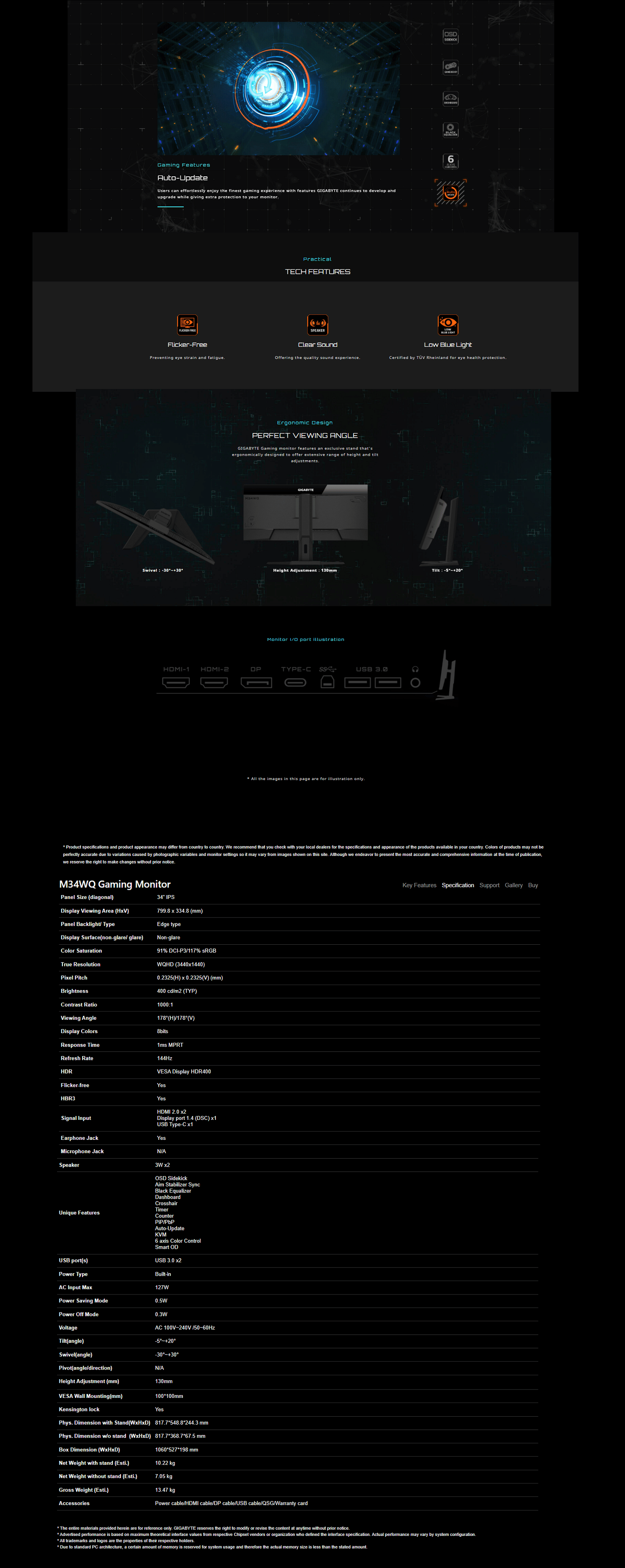
| Display diagonal Size of the display for this product, measured diagonally, usually in inches. | 86.4 cm (34") |
| Display resolution The number of distinct pixels in each dimension that can be displayed. It is usually quoted as width × height, with the units in pixels: for example, "1024 × 768" means the width is 1024 pixels and the height is 768 pixels. The higher the number of pixels, the sharper the image. | 3440 x 1440 pixels |
| HD type Type of supported High Definition (e.g. Full HD, 4K Ultra HD). | Wide Quad HD |
| Display technology The technology used in the display e.g. plasma, LED. | LCD |
| Panel type | IPS |
| Backlight type | Edge LED |
| Touchscreen A screen of a laptop, smartphone, etc., that responds to touch so you can control the interface using your fingers. |
 |
| Display brightness (typical) Display brightness, measured by its Luminance, presented as a figure in candela per square meter (cd/m2). Typical brightness ratings for monitors range from 250 to 350 cd/m2 with a target value of between 80 to 120 cd/m2 being suitable for most displays in a normal viewing environment. | 400 cd/m² |
| Response time The response time is the time difference between the moment that a source (for example a video card) sends a signal and that equipment (for example a monitor) receives or display the signal. (Used abbreviations: R/F = Rise and Fall.) | 1 ms |
| Anti-glare screen Always gives an optimal view, even in direct sunlight. |
 |
| Screen shape | Flat |
| Supported graphics resolutions The graphic resolutions that can be displayed by the device. The graphic resolution describes the width and height dimensions of a display, such as a computer monitor, measured in pixels. | 3440 x 1440 |
| Contrast ratio (typical) The difference in light intensity between the brightest white and the darkest black. | 1000:1 |
| Maximum refresh rate | 144 Hz |
| Viewing angle, horizontal Maximum horizontal angle at which a display can be viewed with acceptable visual performance. | 178° |
| Viewing angle, vertical Maximum vertical angle at which a display can be viewed with acceptable visual performance. | 178° |
| Pixel pitch This is the parameter of a picture tube, which specifies the shortest distance between two dots of the same colour. The principle is: the smaller the dot pitch, the better sharpness of image. | 0.2325 x 0.2325 mm |
| Viewable size, horizontal The viewable size is often somewhat smaller than the actual size of a monitor, because there is a border around the image. | 80 cm |
| Viewable size, vertical | 33.5 cm |
| High Dynamic Range (HDR) supported |
|
| High Dynamic Range (HDR) technology | High Dynamic Range (HDR) 400 |
| Colour depth | 8 bit |
| RGB colour space | sRGB |
| sRGB coverage (typical) | 117% |
| Multimedia | |
| Built-in speaker(s) The device contains speaker(s) to produce sound. |
|
| Built-in camera The product has an integrated camera. |
|
| Number of speakers The quantity of speakers included in/with the product. | 2 |
| RMS rated power RMS (Root mean square) is a measure of the continuous power required by a device, in particular audio amplifiers and loudspeakers. | 3 W |
| Design | |
| Market positioning Under which category can the device be positioned in the market, e.g. camera phone. | Gaming |
| Product colour The colour e.g. red, blue, green, black, white. | Black |
| Detachable stand |
|
| Ports & interfaces | |
| Built-in USB hub Whether or not the device features a USB hub to connect more than one other device via USB. |
|
| HDMI HDMI (High-Definition Multimedia Interface) is a compact audio/video interface for transferring uncompressed video data and compressed/uncompressed digital audio data from a HDMI-compliant device ("the source device") to a compatible computer monitor, video projector, digital television, or digital audio device. HDMI is a digital replacement for existing analog video standards. |
|
| HDMI ports quantity The number of sockets (ports) for HDMI connections. HDMI (High-Definition Multimedia Interface) is a compact audio/video interface for transferring uncompressed video data and compressed/uncompressed digital audio data from a HDMI-compliant device ("the source device") to a compatible computer monitor, video projector, digital television, or digital audio device. HDMI is a digital replacement for existing analog video standards. | 2 |
| HDMI version | 2.0 |
| DisplayPorts quantity Number of DisplayPorts. A DisplayPort is a digital display interface developed by the Video Electronics Standards Association (VESA). The interface is primarily used to connect a video source to a display device such as a computer monitor, though it can also be used to carry audio, USB, and other forms of data. | 1 |
| DisplayPort version | 1.4 |
| Audio input The type of audio input that the device requires, and the connection needed. |
|
| Audio output The type of audio output that the device produces, and the connector(s). |
|
| Headphone out The socket for connecting headphones to the device. |
|
| Headphone connectivity How headphones connect to a device e.g. wirelessly or via a cable and connector. | 3.5 mm |
| Built-in KVM switch |
|
| Ergonomics | |
| VESA mounting |
|
| Panel mounting interface The product can be used wih VESA mounting interfaces. | 100 x 100 mm |
| Cable lock slot Holes on the edge of devices through which a cable lock can be passed, so the device can be locked to a desk etc. |
|
| Cable lock slot type | Kensington |
| Height adjustment | 13 cm |
| Pivot |
|
| Swivelling |
|
| Swivel angle range | -30 - 30° |
| Tilt angle range | -5 - 20° |
| On Screen Display (OSD) |
|
| Tilt adjustment The tilt, which means the angle at which the device is pointing (up or down), can be changed. |
|
| Power | |
| Energy efficiency class (SDR) | G |
| Energy efficiency class (HDR) | G |
| Energy consumption (SDR) per 1000 hours | 32 kWh |
| Energy consumption (HDR) per 1000 hours | 67 kWh |
| Power consumption (max) The maximum amount of power used by the device. | 127 W |
| Power consumption (off) | 0.3 W |
| Power consumption (PowerSave) | 0.5 W |
| AC input voltage The voltage of the AC electricity that is inputted into the product. | 100 - 240 V |
| AC input frequency | 50/60 Hz |
| Energy efficiency scale | A to G |
| Packaging content | |
| Stand included |
|
| Cables included | DisplayPort, HDMI, USB |
| Weight & dimensions | |
| Width (with stand) | 817.7 mm |
| Depth (with stand) | 244.3 mm |
| Height (with stand) | 548.8 mm |
| Weight (with stand) | 10.2 kg |
| Width (without stand) | 81.8 cm |
| Depth (without stand) | 6.75 cm |
| Height (without stand) | 36.9 cm |
| Weight (without stand) | 7.05 kg |
| Packaging data | |
| Package width The distance from one side of the packaging to the other. | 1060 mm |
| Package depth The distance from the front to the back of the packaging. | 198 mm |
| Package height The distance from the top to the bottom of the packaging. | 527 mm |
| Package weight Weight of the packaged product. | 13.5 kg |
| Package type The type of product package e.g. box. | Box |
| Logistics data | |
| Harmonized System (HS) code | 85285210 |
| SKU | 629391 |
| MPN | M34WQ-RFB |
| Brand | Gigabyte |
| Product Condition | Refurbished |
| Warranty Period | 3 Years Warranty |
| Warranty Contact | https://www.gigabyte.com/ |