
Save $50
(Ex-Demo) Dell UD22 USB-C Universal Docking Station, 96W PD, 130W AC Adapter
Item No:
829217
MPN:
210-BFCG-DEMO
$249.00
$199.00
While stocks last!
Payment options
Shipping Information
- Unavailable for shipping
- This product is not currently available for purchase
Store Availability
- Unavailable at Bankstown Store
- Unavailable at Castle Hill Store
- Unavailable at Northmead Store
Please note that this unit has been on display in our retail store. However, each unit has been carefully cleaned, inspected before packing into the original box, we do this to ensure the customer is getting a perfect working order unit in excellent conditions.
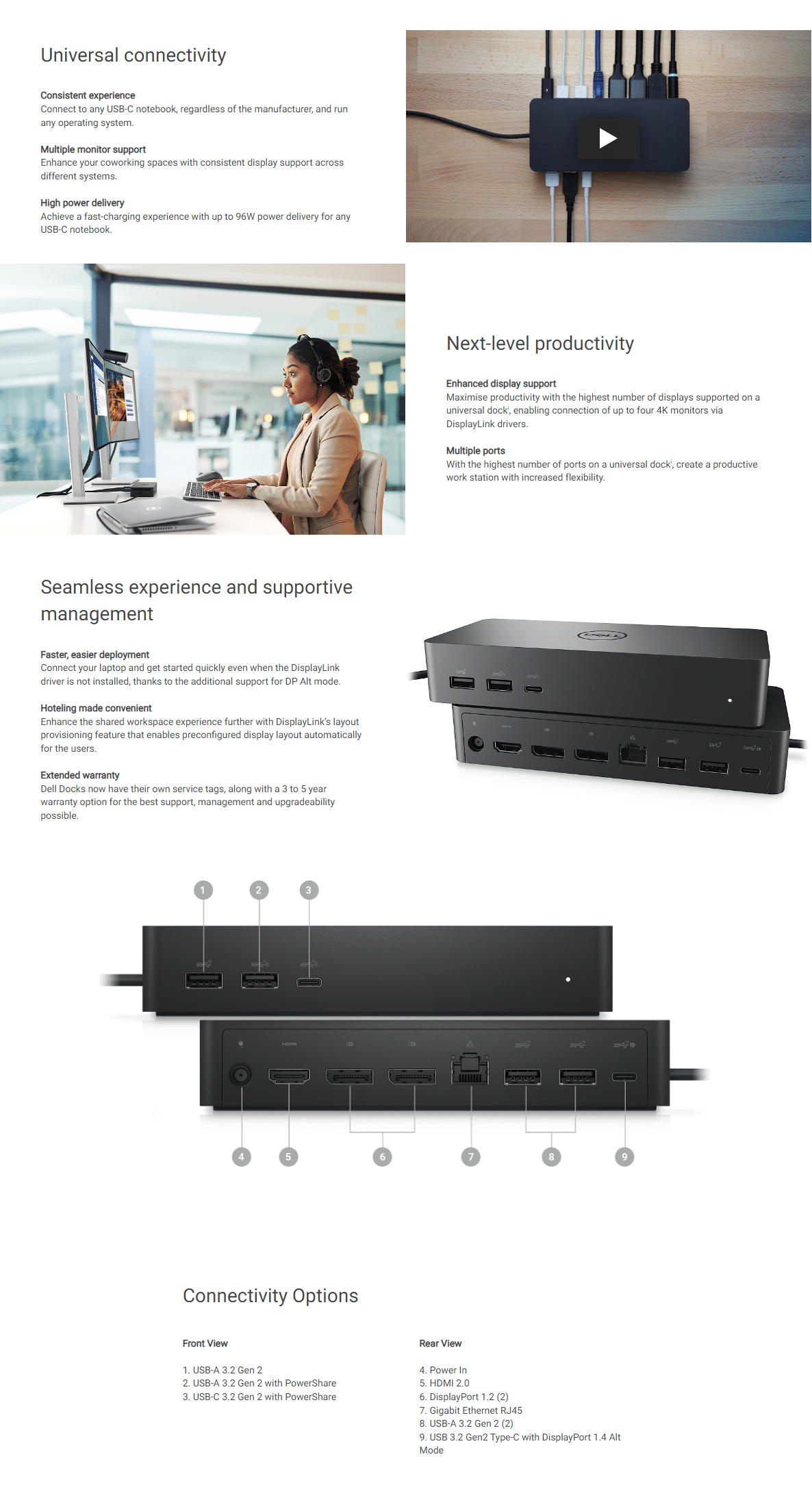
Dell UD22 USB-C Universal Docking Station, 2x DisplayPort 4K, 1x HDMI 4K, 2x USB-C 3.2 Gen2 (1x Alt-Mode DP), 4x USB-A 3.2 Gen2, GbE RJ45, 96W Power Delivery, 130W AC Adapter
| Ports & interfaces | |
| Connectivity technology The technology that enables connectivity of the device, e.g. wired or wireless. | Docking |
| Host interface Interface that enables a host controller to communicate with a driver. | USB 3.2 Gen 1 (3.1 Gen 1) Type-C |
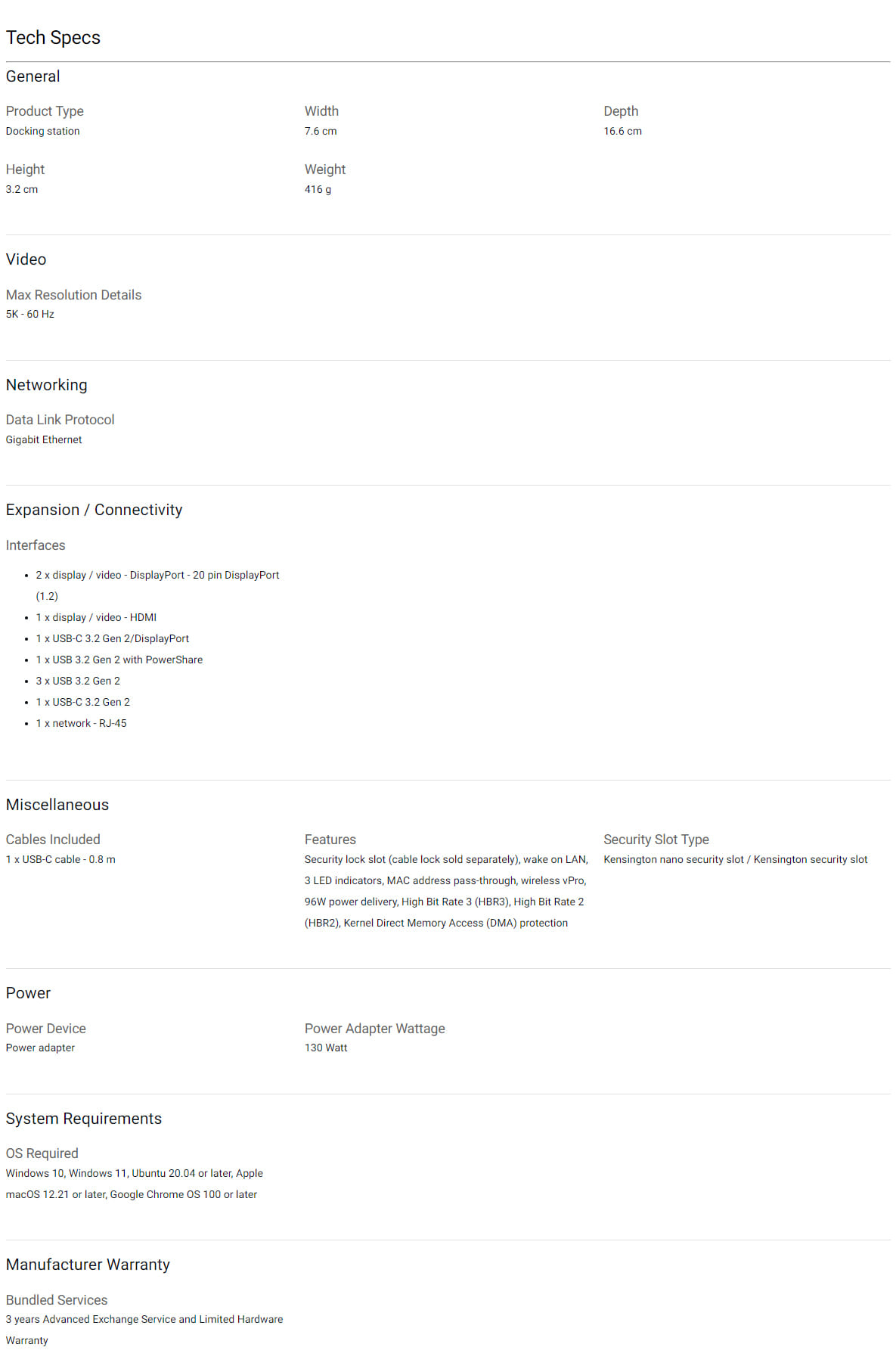
| USB 3.2 Gen 2 (3.1 Gen 2) Type-A ports quantity | 4 |
| USB 3.2 Gen 2 (3.1 Gen 2) Type-C ports quantity Number of USB 3.1 (3.1 Gen 2) ports with Type-C connector. USB 3.1 (3.1 Gen 2) is USB interface version which supports transfer rate up to 10 Gbit/s (SuperSpeed+). USB Type-C connector has symmetrical design architecture and compatible with Thunderbolt 3 interface. | 2 |
| PowerShare |
 |
| Number of USB ports with PowerShare support | 2 |
| USB Power Delivery (USB PD) |
|
| USB Power Delivery revision | 3.0 |
| USB Power Delivery up to | 96 W |
| HDMI ports quantity The number of sockets (ports) for HDMI connections. HDMI (High-Definition Multimedia Interface) is a compact audio/video interface for transferring uncompressed video data and compressed/uncompressed digital audio data from a HDMI-compliant device ("the source device") to a compatible computer monitor, video projector, digital television, or digital audio device. HDMI is a digital replacement for existing analog video standards. | 1 |
| HDMI version | 2.0 |
| DisplayPorts quantity Number of DisplayPorts. A DisplayPort is a digital display interface developed by the Video Electronics Standards Association (VESA). The interface is primarily used to connect a video source to a display device such as a computer monitor, though it can also be used to carry audio, USB, and other forms of data. | 2 |
| DisplayPort version | 1.4 |
| Microphone in The socket where a microphone is connected to the device. |
 |
| DC-in jack The socket/plug where the DC electricity supply connects to the device. |
|
| USB Type-C DisplayPort Alternate Mode |
|
| Network | |
| Ethernet LAN An Ethernet LAN (Local Area Network) interface is present, for a wired conection via a cable. |
|
| Ethernet LAN (RJ-45) ports Number of Ethernet LAN (RJ-45) ports (connecting interfaces) in the device. Ethernet LAN (RJ-45) ports allow a computer to connect to the ethernet. | 1 |
| Ethernet LAN data rates The different speed levels of the Ethernet LAN connection. | 10,100,1000 Mbit/s |
| Performance | |
| Card reader integrated A card reader is a device that enables reading and, in some cases, writing data to and from a memory card. |
|
| Maximum digital resolution | 5120 x 2880 pixels |
| Cable lock slot Holes on the edge of devices through which a cable lock can be passed, so the device can be locked to a desk etc. |
|
| Cable lock slot type | Kensington |
| VESA mounting |
|
| Maximum VESA mount | 100 x 100 mm |
| Product colour The colour e.g. red, blue, green, black, white. | Black |
| LED indicators |
|
| Power | |
| Power source type What the power source is. | DC |
| AC input voltage The voltage of the AC electricity that is inputted into the product. | 100 - 240 V |
| AC input frequency | 50 - 60 Hz |
| Input current | 2.5 A |
| Power supply The way in which the product is powered e.g. rechargeable battery, mains electricity connected via a plug and cable. | 130 W |
| Output voltage | 19.5 V |
| Output current | 6.67 A |
| Software | |
| Windows operating systems supported Windows vesions wich can be used with the device. | Windows 10, Windows 11 |
| Mac operating systems supported Mac operating systems e.g. OS X can be used with the device. | MacOS |
| Linux operating systems supported 8 RT. Linux (9.4, 9.5), Red Hat Enterprise Linux 5.0 (supported with a pre-built package); SUSE Linux (10.3, 11.0, 11, 11.1, 11.2), Fedora (9, 9.0, 10, 10.0, 11.0, 11, 12, 12.0), Ubuntu (8.04, 8.04.1, 8.04.2, 8.10, 9.04, 9.10, 10.04), Debian (5.0, 5.0.1, 5.0.2, 5.0.3) | Ubuntu 20.04 LTS |
| Other operating systems supported | ChromeOS |
| Operational conditions | |
| Operating temperature (T-T) The minimum and maximum temperatures at which the product can be safely operated. | 0 - 35 °C |
| Storage temperature (T-T) The minimum and maximum temperatures at which the product can be safely stored. | -20 - 60 °C |
| Operating relative humidity (H-H) | 10 - 80% |
| Storage relative humidity (H-H) | 5 - 90% |
| Weight & dimensions | |
| Width The measurement or extent of something from side to side. | 76 mm |
| Depth The distance from the front to the back of something. | 166 mm |
| Height The measurement of the product from head to foot or from base to top. | 32 mm |
| Weight Weight of the product without packaging (net weight). If possible, the net weight is given including standard accessories and supplies. Please note that sometimes the manufacturer leaves out the weight of accessories and/or supplies. | 416 g |
| Packaging content | |
| Cables included | USB Type-C |
| AC adapter included |
|
| Quick start guide Instructions, either online, as a computer program or in paper form, to allow you to set up and start using the product quickly. |
|
| SKU | 829217 |
| MPN | 210-BFCG-DEMO |
| Brand | Dell |
| Product Condition | Ex-Demo |
| Stock Availability | Available for Shipping, In Stock at Warehouse |
| Product Use | General |
| Warranty Period | 90 Days Warranty |
| Warranty Contact | https://www.dell.com/ |