Please note this machine has been used by Acer Australia as demonstration or Media testing purpose only ! Laptop has been professionally cleaned, reset and packed by Acer Australia and it does come with Acer / JW 12 Months Warranty !
Display diagonal
Size of the display for this product, measured diagonally, usually in inches.
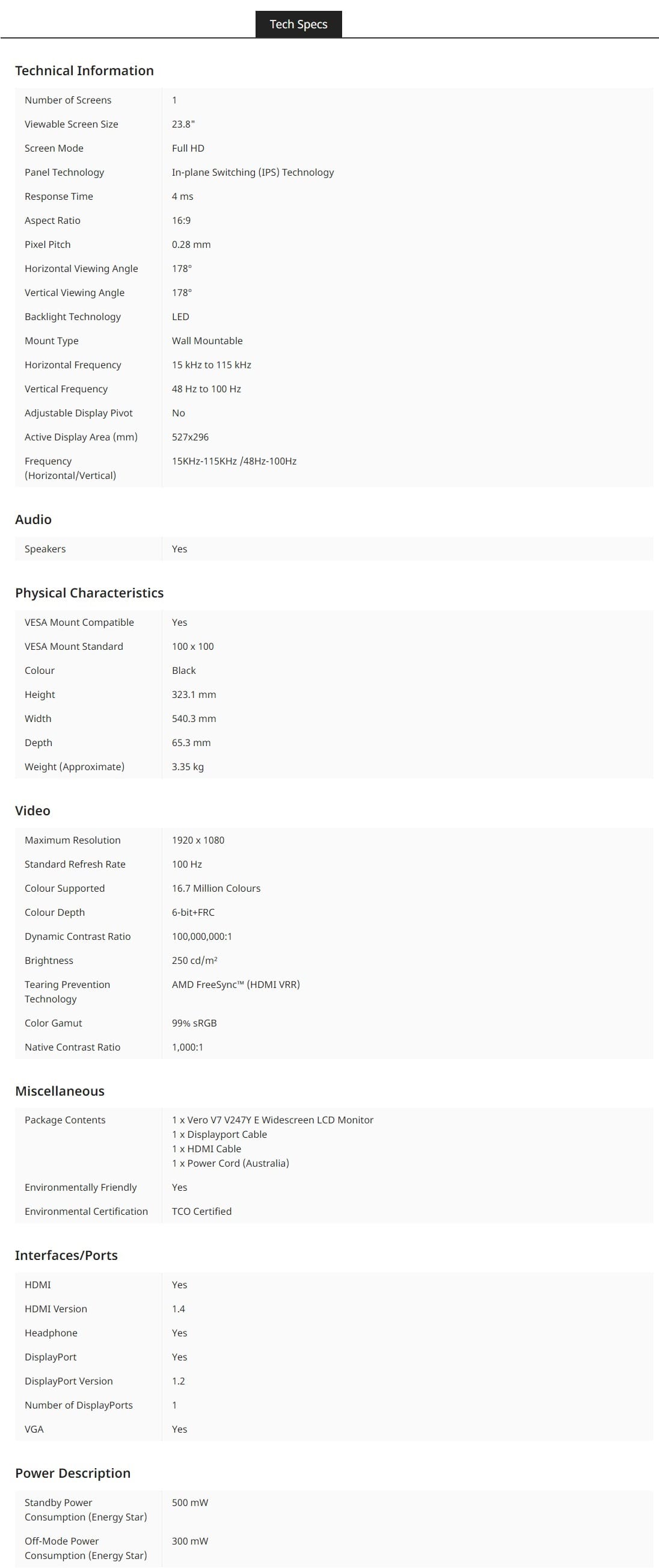
60.5 cm (23.8")
Display resolution
The number of distinct pixels in each dimension that can be displayed. It is usually quoted as width × height, with the units in pixels: for example, "1024 × 768" means the width is 1024 pixels and the height is 768 pixels. The higher the number of pixels, the sharper the image.
1920 x 1080 pixels
HD type
Type of supported High Definition (e.g. Full HD, 4K Ultra HD).
Full HD
Native aspect ratio
The aspect ratio is the ratio of the width of an image to its height. The native aspect ratio is the one which the projector/display is particularly designed for. Images shown in native aspect ratio will utilize the entire resolution of the display and achieve maximum brightness. Images shown in other than native aspect ratio will always have less resolution and less brightness than images shown in native aspect ratio.
16:9
Display technology
The technology used in the display e.g. plasma, LED.
LED
Panel type
IPS
Touchscreen
A screen of a laptop, smartphone, etc., that responds to touch so you can control the interface using your fingers.
Display brightness (typical)
Display brightness, measured by its Luminance, presented as a figure in candela per square meter (cd/m2). Typical brightness ratings for monitors range from 250 to 350 cd/m2 with a target value of between 80 to 120 cd/m2 being suitable for most displays in a normal viewing environment.
250 cd/m²
Response time
The response time is the time difference between the moment that a source (for example a video card) sends a signal and that equipment (for example a monitor) receives or display the signal. (Used abbreviations: R/F = Rise and Fall.)
4 ms
Screen shape
Flat
Contrast ratio (dynamic)
A property of a display system, defined as the ratio of the luminance of the brightest color (white) to that of the darkest color (black) that the system is capable of producing.
100000000:1
Maximum refresh rate
100 Hz
Viewing angle, horizontal
Maximum horizontal angle at which a display can be viewed with acceptable visual performance.
178°
Viewing angle, vertical
Maximum vertical angle at which a display can be viewed with acceptable visual performance.
178°
Display number of colours
16.7 million colours
Pixel pitch
This is the parameter of a picture tube, which specifies the shortest distance between two dots of the same colour. The principle is: the smaller the dot pitch, the better sharpness of image.
0.28 x 0.28 mm
Horizontal scan range
15 - 115 kHz
Vertical scan range
48 - 100 Hz
Viewable size, horizontal
The viewable size is often somewhat smaller than the actual size of a monitor, because there is a border around the image.
52.7 cm
Viewable size, vertical
29.6 cm
Colour depth
6 bit
Colour gamut standard
sRGB
Colour gamut
99%
Performance
NVIDIA G-SYNC
AMD FreeSync
The product includes AMD Freesync Technology for the dynamic synchronization of the graphic card and the monitor in order to avoid screen tearing.
AMD FreeSync type
FreeSync
Multimedia
Built-in speaker(s)
The device contains speaker(s) to produce sound.
Design
Product colour
The colour e.g. red, blue, green, black, white.
Black
Ports & interfaces
VGA (D-Sub) ports quantity
Number of VGA (D-Sub) ports (connecting interfaces) in the device. The VGA (D-Sub) connector is a 15 pin connector between a computer and a monitor. It was first introduced in 1987 by IBM.
1
HDMI
HDMI (High-Definition Multimedia Interface) is a compact audio/video interface for transferring uncompressed video data and compressed/uncompressed digital audio data from a HDMI-compliant device ("the source device") to a compatible computer monitor, video projector, digital television, or digital audio device. HDMI is a digital replacement for existing analog video standards.
HDMI ports quantity
The number of sockets (ports) for HDMI connections. HDMI (High-Definition Multimedia Interface) is a compact audio/video interface for transferring uncompressed video data and compressed/uncompressed digital audio data from a HDMI-compliant device ("the source device") to a compatible computer monitor, video projector, digital television, or digital audio device. HDMI is a digital replacement for existing analog video standards.
1
HDMI version
1.4
DisplayPorts quantity
Number of DisplayPorts. A DisplayPort is a digital display interface developed by the Video Electronics Standards Association (VESA). The interface is primarily used to connect a video source to a display device such as a computer monitor, though it can also be used to carry audio, USB, and other forms of data.
1
DisplayPort version
1.2
Headphone out
The socket for connecting headphones to the device.
Ergonomics
VESA mounting
Panel mounting interface
The product can be used wih VESA mounting interfaces.
100 x 100 mm
Wall mountable
The product can be mounted on (attached to ) a wall.
Power
Energy efficiency class (SDR)
E
Energy consumption (SDR) per 1000 hours
18 kWh
Power consumption (standby)
The amount of electricity that is consumed when the product is on standby.
0.5 W
Power consumption (off)
0.3 W
Energy efficiency scale
A to G
Weight & dimensions
Width (with stand)
540.3 mm
Depth (with stand)
65.3 mm
Height (with stand)
323.1 mm
Weight (with stand)
3.35 kg
Sustainability
Sustainability compliance
Sustainability certificates
TCO
European Product Registry for Energy Labelling (EPREL) code