Save $19
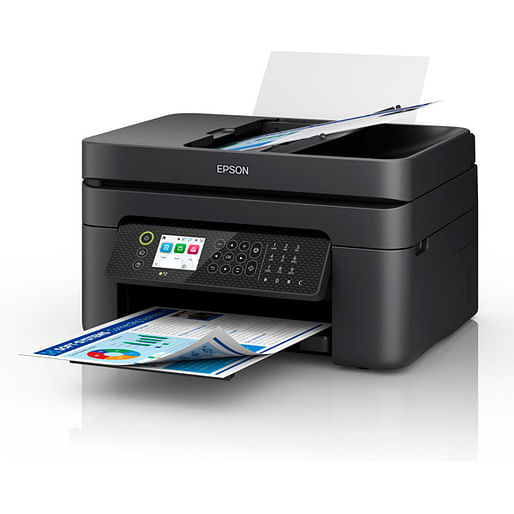
Epson WF-2950 4 Colour Multi-Function ADF Inkjet Printer (Print/Copy/Scan/Wi-Fi Direct)
Item No:
694562
MPN:
C11CK62501
$159.00
$140.48
While stocks last!
Payment options
Shipping Information
- Available for shipping
- Usually leaves our partner warehouse in 2-4 business days
Store Availability
- 3-5 business days at Bankstown Store
- 3-5 business days at Castle Hill Store
- 2-4 business days at Northmead Store
Shipping Estimate
Epson WorkForce WF-2950, Inkjet, Colour printing, 5760 x 1440 DPI, A4, Direct printing, Black
ALL-ROUND 4-in-1 PRINTER
A compact, reliable performer, the wireless WorkForce WF-2950 is the perfect choice for efficient home office printing. Featuring fast print speeds, plus auto 2-sided printing and a 30-page Auto Document Feeder, the WF-2950 delivers professional-quality documents, reports and proposals.
HIGH-SPEED FAXING
Fax as fast as 3 seconds per page, save up to 100 pages in memory, and store up to 100 speed dialing numbers. Using the included PC-Fax, you can even send a colour fax right from your computer. It is a great way to save time and paper.
AFFORDABLE INDIVIDUAL INK CARTRIDGES
Depending on what you are printing " lots of blue skies will mean your cyan will need replacing sooner than other colours " your printer's ink will reduce at different levels. With individual inks you only need to replace one cartridge at a time " the one that actually needs replacing. With tri-colour cartridges, you end up throwing away the entire cartridge even if just one colour runs out, meaning you waste the good ink you have left. Wasted ink is just wasted money. Epson individual ink cartridges means you save money and don't waste ink.
EPSON SMART-PANEL
An innovative interface, the Epson Smart Panel app 2 transforms your iOS or Android mobile device 3 into an intuitive control centre for your Epson WorkForce WF-2950. This powerful tool makes it easy to set up, monitor, print, scan and more using your Epson printer, right from your hand-held device. With quick-configuration features, it offers easy product setup on your wireless network and automatically detects your printer. Customise the app to your own preferences and requirements. Built to offer everything you need in one convenient app, Epson Smart Panel allows you to register your product, order supplies and easily access troubleshooting tips.
POWERED BY HEAT-FREE TECHNOLOGY
The Epson WorkForce WF-2950 is powered by Epson Micro Piezo with Heat-Free Technology. Micro Piezo technology utilises piezo crystals that pulse when electrical signals are sent to them by the printer. It produces incredibly consistent droplets, both in shape and size, to deliver clear and sharp prints.
Simple wired & wireless connectivity
The Epson WorkForce WF-2950 supports the latest wireless standard, 802.11 b/g/n ' and includes Wi-Fi Direct . Which means no router is required, providing users with greater coverage and faster speeds. You can use your printer from anywhere in your home and share it with multiple PCs.
Print from your iPad or iPhone
Apple AirPrint makes it simple to print emails, web pages, presentations and documents straight from their iPad or iPhone. There's no software to download, no drivers to install and no cables to connect. Your Apple IOS device will automatically connect to the printer.
1 Most features require an Internet connection to the printer, as well as an Internet and/or email-enabled device.
2 Requires Epson Smart Panel app download. Data usage fees may apply.
3 Compatible mobile device operating systems " for iOS: 11.0 or later; for iPadOS : OS 13.1 or later; for Android: 5.0 or later.
4 Wi-Fi CERTIFIED , level of performance subject to the range of the router being used. Wi-Fi Direct may require printer software
A compact, reliable performer, the wireless WorkForce WF-2950 is the perfect choice for efficient home office printing. Featuring fast print speeds, plus auto 2-sided printing and a 30-page Auto Document Feeder, the WF-2950 delivers professional-quality documents, reports and proposals.
HIGH-SPEED FAXING
Fax as fast as 3 seconds per page, save up to 100 pages in memory, and store up to 100 speed dialing numbers. Using the included PC-Fax, you can even send a colour fax right from your computer. It is a great way to save time and paper.
AFFORDABLE INDIVIDUAL INK CARTRIDGES
Depending on what you are printing " lots of blue skies will mean your cyan will need replacing sooner than other colours " your printer's ink will reduce at different levels. With individual inks you only need to replace one cartridge at a time " the one that actually needs replacing. With tri-colour cartridges, you end up throwing away the entire cartridge even if just one colour runs out, meaning you waste the good ink you have left. Wasted ink is just wasted money. Epson individual ink cartridges means you save money and don't waste ink.
EPSON SMART-PANEL
An innovative interface, the Epson Smart Panel app 2 transforms your iOS or Android mobile device 3 into an intuitive control centre for your Epson WorkForce WF-2950. This powerful tool makes it easy to set up, monitor, print, scan and more using your Epson printer, right from your hand-held device. With quick-configuration features, it offers easy product setup on your wireless network and automatically detects your printer. Customise the app to your own preferences and requirements. Built to offer everything you need in one convenient app, Epson Smart Panel allows you to register your product, order supplies and easily access troubleshooting tips.
POWERED BY HEAT-FREE TECHNOLOGY
The Epson WorkForce WF-2950 is powered by Epson Micro Piezo with Heat-Free Technology. Micro Piezo technology utilises piezo crystals that pulse when electrical signals are sent to them by the printer. It produces incredibly consistent droplets, both in shape and size, to deliver clear and sharp prints.
Simple wired & wireless connectivity
The Epson WorkForce WF-2950 supports the latest wireless standard, 802.11 b/g/n ' and includes Wi-Fi Direct . Which means no router is required, providing users with greater coverage and faster speeds. You can use your printer from anywhere in your home and share it with multiple PCs.
Print from your iPad or iPhone
Apple AirPrint makes it simple to print emails, web pages, presentations and documents straight from their iPad or iPhone. There's no software to download, no drivers to install and no cables to connect. Your Apple IOS device will automatically connect to the printer.
1 Most features require an Internet connection to the printer, as well as an Internet and/or email-enabled device.
2 Requires Epson Smart Panel app download. Data usage fees may apply.
3 Compatible mobile device operating systems " for iOS: 11.0 or later; for iPadOS : OS 13.1 or later; for Android: 5.0 or later.
4 Wi-Fi CERTIFIED , level of performance subject to the range of the router being used. Wi-Fi Direct may require printer software
| Printing | |
| Print technology Indicates the method used to print by this product. | Inkjet |
| Printing Producing a paper copy of information stored on a computer. | Colour printing |
| Maximum resolution Maximum printing resolution. | 5760 x 1440 DPI |
| Print speed (black, normal quality, A4/US Letter) The print speed of a printer for black & white A4 pages, normal quality. The exact speed varies depending on the system configuration, software program, and document complexity. | 10 ppm |
| Print speed (colour, normal quality, A4/US Letter) | 5 ppm |
| Copying | |
| Copying Description of copying function (colour or monochrome). | Colour copying |
| Copy speed (black, normal quality, A4) | 8.4 cpm |
| Copy speed (colour, normal quality, A4) | 4.3 cpm |
| Scanning | |
| Scanning To convert a document or picture into digital form for storage or processing on a computer, by scanning it using a scanner. | Colour scanning |
| Optical scanning resolution How many pixels a scanner can see. Most commonly, this is measured in dots per inch (dpi).For example, a typical flatbed scanner will use a scanning head with 300 sensors per inch, so it can sample 300 dots per inch (dpi) in one direction. To scan in the other direction, it will move the scanning head along the page, stopping 300 times per inch, so it can scan 300 dpi in the other direction as well. This scanner would have an optical resolution of 300 x 300 dpi. Some manufacturers stop the scanning head more frequently as it moves down the page, so their machines have resolutions of 300 x 600 dpi or 300x1200 dpi. | 1200 x 2400 DPI |
| Scanner type Indicates the type of scanner this product is. | Flatbed scanner |
| Scan technology Indicates the technology used to scan by this product | CIS |
| Input colour depth Colour depth of the input into the product. The colour depth is either the number of bits used to indicate the color of a single pixel, in a bitmapped image or video frame buffer, or the number of bits used for each color component of a single pixel. High-end laptops have 24-bit colour depth. | 48 bit |
| Output colour depth | 24 bit |
| Fax | |
| Faxing To send an exact copy of a document made by electronic scanning and transmitted as data by telecommunications links. | Colour faxing |
| Fax transmission speed | 3 sec/page |
| Fax memory | 100 pages |
| Speed dialling |
 |
| Features | |
| Number of print cartridges The amount of print cartridges. A print cartridge is a container holding a quantity of ink which is inserted into a inkjet printer mechanism. | 4 |
| Printing colours The colours that can be produced by the printer. | Black, Cyan, Magenta, Yellow |
| All-In-One-multitasking |
|
| Input & output capacity | |
| Total number of input trays | 2 |
| Total input capacity | 30 sheets |
| Total output capacity | 30 sheets |
| Auto document feeder (ADF) |
|
| Auto document feeder (ADF) input capacity Number of sheets this product can hold in its ADF tray; expressed in sheets | 30 sheets |
| Paper handling | |
| Maximum ISO A-series paper size The maximum paper size the device can handle, defined by ISO A-series. | A4 |
| Paper tray media types | Plain paper |
| ISO A-series sizes (A0...A9) Different sizes of paper from A0 (big) to A9 (small). A4 is the most common size used for printing documents. | A4 |
| Ports & interfaces | |
| Direct printing With direct printing it is possible to print your photographs or other documents directly to a printer from a compatible device, without the use of a computer. |
|
| USB port The device features a socket into which a USB cable can be plugged. |
|
| USB 2.0 ports quantity Number of USB 2.0 ports (connecting interfaces) in the device. USB 2.0 was released in April 2000 (now called "Hi-Speed"), adding higher maximum signaling rate of 480 Mbit/s (effective throughput up to 35 MB/s or 280 Mbit/s), USB 2.0 ports are usually black. | 1 |
| Network | |
| Wi-Fi Popular technology that allows an electronic device to exchange data or connect to the internet wirelessly using radio waves. |
|
| Wi-Fi standards The type of wireless local area network (LAN). It can be ad-hoc, where units in a network communicate peer-to-peer, or Infrastructure, where units communicate with each other via an access point A LAN interconnects computers in a small area e.g. home, school or office. | 802.11b, 802.11g, Wi-Fi 4 (802.11n) |
| Performance | |
| Internal memory The amount of memory, usually measured in bytes (e.g. MB, GB), which is installed in the system's hardware. | 1.1 MB |
| Design | |
| Product colour The colour e.g. red, blue, green, black, white. | Black |
| Market positioning Under which category can the device be positioned in the market, e.g. camera phone. | Home & office |
| Built-in display A display which is part of the product, so you do not need to attach another display. |
|
| Display The description of display that can includes display type, resolution, size etc. | LCD |
| Display diagonal Size of the display for this product, measured diagonally, usually in inches. | 6.1 cm (2.4") |
| Power | |
| Power consumption (average operating) | 12 W |
| Power consumption (PowerSave) | 0.7 W |
| AC input voltage The voltage of the AC electricity that is inputted into the product. | 100 - 240 V |
| AC input frequency | 50/60 Hz |
| System requirements | |
| Windows operating systems supported Windows vesions wich can be used with the device. | Windows 10, Windows 11, Windows 7, Windows 8, Windows 8.1, Windows Vista, Windows XP, Windows XP Professional x64 |
| Mac operating systems supported Mac operating systems e.g. OS X can be used with the device. | Mac OS X 10.6 Snow Leopard |
| Weight & dimensions | |
| Width The measurement or extent of something from side to side. | 375 mm |
| Depth The distance from the front to the back of something. | 300 mm |
| Height The measurement of the product from head to foot or from base to top. | 218 mm |
| Weight Weight of the product without packaging (net weight). If possible, the net weight is given including standard accessories and supplies. Please note that sometimes the manufacturer leaves out the weight of accessories and/or supplies. | 5.3 kg |
| Packaging content | |
| Cartridge(s) included |
|
| Included cartridge capacity (black) | 1 pages |
| Cables included | AC, USB |
| SKU | 694562 |
| MPN | C11CK62501 |
| Brand | Epson |
| Assembled to Order | No |
| Shipping Latency | None |
| Display In Stock In Frontend | No |
| Product Condition | Brand New/Unused |
| Printer Type | Multi-Function Printer, Inkjet |
| Print Scan Features | Print, Scan, Copy |
| Scanner Type | Flatbed |
| Wired/Wireless | Wired |
| Stock Availability | Available for Shipping |
| Product Use | General |
| Warranty Period | 1 Year Warranty |
| Warranty Contact | https://www.epson.com.au/ |