Shipping Information
- Available for shipping
- Usually leaves our partner warehouse in 2-4 business days
Store Availability
- 3-5 business days at Bankstown Store
- 3-5 business days at Castle Hill Store
- 2-4 business days at Northmead Store
Shipping Estimate
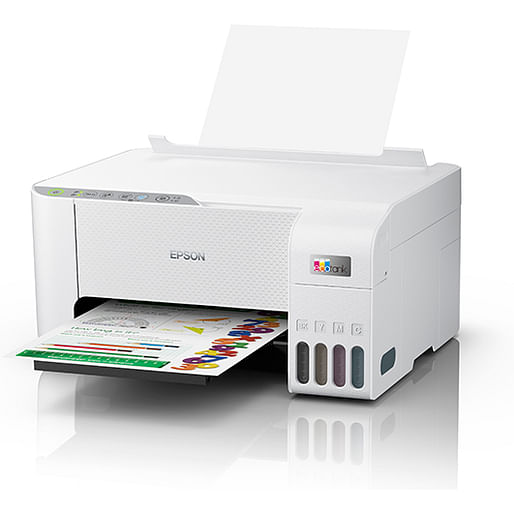
Epson EcoTank ET-2810, Inkjet, Colour printing, 5760 x 1440 DPI, A4, Direct printing, White
The Epson EcoTank ET-2810 wireless all-in-one printer offers cartridge-free printing with easy-to-fill, supersized ink tanks. Each replacement ink bottle set includes enough ink to print up to 4,500 pages1 " equivalent to about 203 individual cartridges2, that means less waste. Exclusive uniquely keyed EcoTank bottles make it easy to fill each colour tank. This premium printer also offers convenient wireless printing from tablets and smartphones3, plus a 2-year Return to Base Warranty with registration4.
PRINTING FREEDOM
With an integrated high capacity ink tank system, the Epson EcoTank ET-2810 comes with enough ink in the box to print up to 3,600 pages in black / 6,500 pages in colour1 without worrying about ongoing ink replacement and costs.
HIGH-VOLUME INK BOTTLES
Additional low-cost ink can be bought in convenient high-volume bottles that have a drip-free nozzle and resealable cap for easy storage and refilling. We have redesigned our ink bottles to incorporate a unique key system. Each bottle is keyed so that it only fits into the corresponding ink tank on the printer, thus preventing mis-filling or spillage. Replacement bottles hold enough ink for a massive 4,500 pages in black / 7,500 pages in colour1.
POWERED BY HEAT-FREE TECHNOLOGY
The Epson EcoTank ET-2810 is powered by Epson Micro Piezo with Heat-Free Technology. Micro Piezo technology utilises piezo crystals that pulse when electrical signals are sent to them by the printer. It produces incredibly consistent droplets, both in shape and size, to deliver clear and sharp prints.
EPSON SMART-PANEL
An innovative interface, the Epson Smart Panel app5 transforms your iOS or Android mobile device6 into an intuitive control center for your Epson EcoTank ET-2810. This powerful tool makes it easy to set up, monitor, print, scan and more using your Epson printer, right from your hand-held device. With quick-configuration features, it offers easy product setup on your wireless network and automatically detects your printer. Customize the app to your own preferences and requirements.
SIMPLE NAVIGATION
Navigating the printer is simple with the user-friendly control panel buttons. Making printing of documents, reports, invoices and presentations easy at just the touch of a button.
Simple wireless connectivity
The Epson EcoTank ET-2810 supports the latest wireless standard, 802.11 b/g/n7 and includes Wi-Fi Direct . Which means no router is required, providing users with greater coverage and faster speeds. You can use your EcoTank printer from anywhere in your home and share it with multiple PCs.
PRINTING FREEDOM
With an integrated high capacity ink tank system, the Epson EcoTank ET-2810 comes with enough ink in the box to print up to 3,600 pages in black / 6,500 pages in colour1 without worrying about ongoing ink replacement and costs.
HIGH-VOLUME INK BOTTLES
Additional low-cost ink can be bought in convenient high-volume bottles that have a drip-free nozzle and resealable cap for easy storage and refilling. We have redesigned our ink bottles to incorporate a unique key system. Each bottle is keyed so that it only fits into the corresponding ink tank on the printer, thus preventing mis-filling or spillage. Replacement bottles hold enough ink for a massive 4,500 pages in black / 7,500 pages in colour1.
POWERED BY HEAT-FREE TECHNOLOGY
The Epson EcoTank ET-2810 is powered by Epson Micro Piezo with Heat-Free Technology. Micro Piezo technology utilises piezo crystals that pulse when electrical signals are sent to them by the printer. It produces incredibly consistent droplets, both in shape and size, to deliver clear and sharp prints.
EPSON SMART-PANEL
An innovative interface, the Epson Smart Panel app5 transforms your iOS or Android mobile device6 into an intuitive control center for your Epson EcoTank ET-2810. This powerful tool makes it easy to set up, monitor, print, scan and more using your Epson printer, right from your hand-held device. With quick-configuration features, it offers easy product setup on your wireless network and automatically detects your printer. Customize the app to your own preferences and requirements.
SIMPLE NAVIGATION
Navigating the printer is simple with the user-friendly control panel buttons. Making printing of documents, reports, invoices and presentations easy at just the touch of a button.
Simple wireless connectivity
The Epson EcoTank ET-2810 supports the latest wireless standard, 802.11 b/g/n7 and includes Wi-Fi Direct . Which means no router is required, providing users with greater coverage and faster speeds. You can use your EcoTank printer from anywhere in your home and share it with multiple PCs.
| Printing | |
| Duplex printing mode | Manual |
| Print technology Indicates the method used to print by this product. | Inkjet |
| Printing Producing a paper copy of information stored on a computer. | Colour printing |
| Duplex printing Feature of computer printers and multifunction printers (MFPs) that allows the automatic printing of a sheet of paper on both sides. |
 |
| Maximum resolution Maximum printing resolution. | 5760 x 1440 DPI |
| Print speed (black, normal quality, A4/US Letter) The print speed of a printer for black & white A4 pages, normal quality. The exact speed varies depending on the system configuration, software program, and document complexity. | 33 ppm |
| Print speed (colour, normal quality, A4/US Letter) | 15 ppm |
| Print speed (ISO/IEC 24734) black | 10 ppm |
| Print speed (ISO/IEC 24734) colour | 5 ppm |
| Time to first page (black, normal) | 10 s |
| Time to first page (colour, normal) | 16 s |
| Borderless printing Indicates whether this product is capable of printing borderless photos. |
|
| Scanning | |
| Scanning To convert a document or picture into digital form for storage or processing on a computer, by scanning it using a scanner. | Colour scanning |
| Optical scanning resolution How many pixels a scanner can see. Most commonly, this is measured in dots per inch (dpi).For example, a typical flatbed scanner will use a scanning head with 300 sensors per inch, so it can sample 300 dots per inch (dpi) in one direction. To scan in the other direction, it will move the scanning head along the page, stopping 300 times per inch, so it can scan 300 dpi in the other direction as well. This scanner would have an optical resolution of 300 x 300 dpi. Some manufacturers stop the scanning head more frequently as it moves down the page, so their machines have resolutions of 300 x 600 dpi or 300x1200 dpi. | 1200 x 2400 DPI |
| Scanner type Indicates the type of scanner this product is. | Flatbed scanner |
| Scan technology Indicates the technology used to scan by this product | CIS |
| Image formats supported The type of image files that the device can use/display e.g. gif, JPEG (jpg). | BMP, JPEG, PICT, PNG, TIFF |
| Document formats supported The type of document formats that can be read/produced with this device e.g. .docx, .pdf. |
| Fax | |
| Faxing To send an exact copy of a document made by electronic scanning and transmitted as data by telecommunications links. |
 |
| Features | |
| Duplex functions The product has the ability to print, scan etc. on both sides of a sheet of paper. | |
| Number of print cartridges The amount of print cartridges. A print cartridge is a container holding a quantity of ink which is inserted into a inkjet printer mechanism. | 4 |
| Printing colours The colours that can be produced by the printer. | Black, Cyan, Magenta, Yellow |
| Country of origin Country where the device is made. Aka Country of manufacture (COM). | Philippines |
| Input & output capacity | |
| Total number of input trays | 1 |
| Total input capacity | 100 sheets |
| Total output capacity | 30 sheets |
| Paper handling | |
| Maximum ISO A-series paper size The maximum paper size the device can handle, defined by ISO A-series. | A4 |
| Paper tray media types | Photo paper, Plain paper |
| ISO A-series sizes (A0...A9) Different sizes of paper from A0 (big) to A9 (small). A4 is the most common size used for printing documents. | A4,A5,A6 |
| ISO B-series sizes (B0...B9) | B5,B6 |
| Envelopes sizes | 10,C6,DL |
| Photo paper sizes | 9x13,10x15,13x20 |
| Ports & interfaces | |
| Direct printing With direct printing it is possible to print your photographs or other documents directly to a printer from a compatible device, without the use of a computer. |
|
| USB port The device features a socket into which a USB cable can be plugged. |
|
| Network | |
| Wi-Fi Popular technology that allows an electronic device to exchange data or connect to the internet wirelessly using radio waves. |
|
| Ethernet LAN An Ethernet LAN (Local Area Network) interface is present, for a wired conection via a cable. |
|
| Security algorithms Security algorithms are used to provide authentication, cipher key generation, integrity and radio link privacy to users on mobile networks. The security algorithms supported are the ones that can be used with this product. | 64-bit WEP,128-bit WEP,WPA-AES,WPA-PSK,WPA-TKIP |
| Design | |
| Product colour The colour e.g. red, blue, green, black, white. | White |
| Market positioning Under which category can the device be positioned in the market, e.g. camera phone. | Home & office |
| Built-in display A display which is part of the product, so you do not need to attach another display. |
|
| Power | |
| Power consumption (copying) | 12 W |
| Power consumption (ready) | 4.5 W |
| Power consumption (sleep) | 0.7 W |
| Power consumption (off) | 0.2 W |
| Energy Star Typical Electricity Consumption (TEC) | 0.15 kWh/week |
| AC input voltage The voltage of the AC electricity that is inputted into the product. | 100 - 240 V |
| AC input frequency | 50/60 Hz |
| System requirements | |
| Windows operating systems supported Windows vesions wich can be used with the device. | Windows 10,Windows 7,Windows 8,Windows 8.1,Windows Vista |
| Mac operating systems supported Mac operating systems e.g. OS X can be used with the device. | Mac OS X 10.7 Lion,Mac OS X 10.8 Mountain Lion,Mac OS X 10.9 Mavericks,Mac OS X 11.0 Big Sur |
| Server operating systems supported | Windows Server 2003 R2,Windows Server 2008 R2,Windows Server 2012 R2,Windows Server 2016 |
| Weight & dimensions | |
| Width The measurement or extent of something from side to side. | 375 mm |
| Depth The distance from the front to the back of something. | 347 mm |
| Height The measurement of the product from head to foot or from base to top. | 179 mm |
| Weight Weight of the product without packaging (net weight). If possible, the net weight is given including standard accessories and supplies. Please note that sometimes the manufacturer leaves out the weight of accessories and/or supplies. | 3.9 kg |
| Packaging data | |
| Package width The distance from one side of the packaging to the other. | 405 mm |
| Package depth The distance from the front to the back of the packaging. | 445 mm |
| Package height The distance from the top to the bottom of the packaging. | 230 mm |
| Package weight Weight of the packaged product. | 5.83 kg |
| Packaging content | |
| Cartridge(s) included |
|
| Cables included | AC |
| Logistics data | |
| Harmonized System (HS) code | 8443310000 |
| SKU | 554862 |
| MPN | C11CJ67501 |
| Brand | Epson |
| Product Condition | Brand New/Unused |
| Printer Type | Multi-Function Printer, Inkjet |
| Print Scan Features | Print, Scan, Copy |
| Scanner Type | Flatbed |
| Wired/Wireless | Wireless |
| Stock Availability | Available for Shipping |
| Product Use | General |
| Warranty Period | 2 Years Return To Base Warranty |
| Warranty Contact | https://www.epson.com.au/ |