LED backlight
A backlight is a form of illumination used in liquid crystal displays (LCDs). One type of backlight is made by LEDs, which can be either white or RGB (red green blue). White LEDs are used most often in notebooks and desktop screens, and in virtually all mobile LCD screens. RGB LEDs for backlighting are found in high-end color proofing displays such as HP DreamColor LP2480zx monitor or selected HP EliteBook notebooks, as well as newer consumer grade displays such as Dell's Studio series laptops which have an optional RGB LED display.
LED backlighting type
Backlighting is the illumination of a screen e.g. LCD (liquid crystal display). There are several types of backlighting with LEDs, e.g. full array, edge lit.
Direct-LED
Display diagonal
Size of the display for this product, measured diagonally, usually in inches.
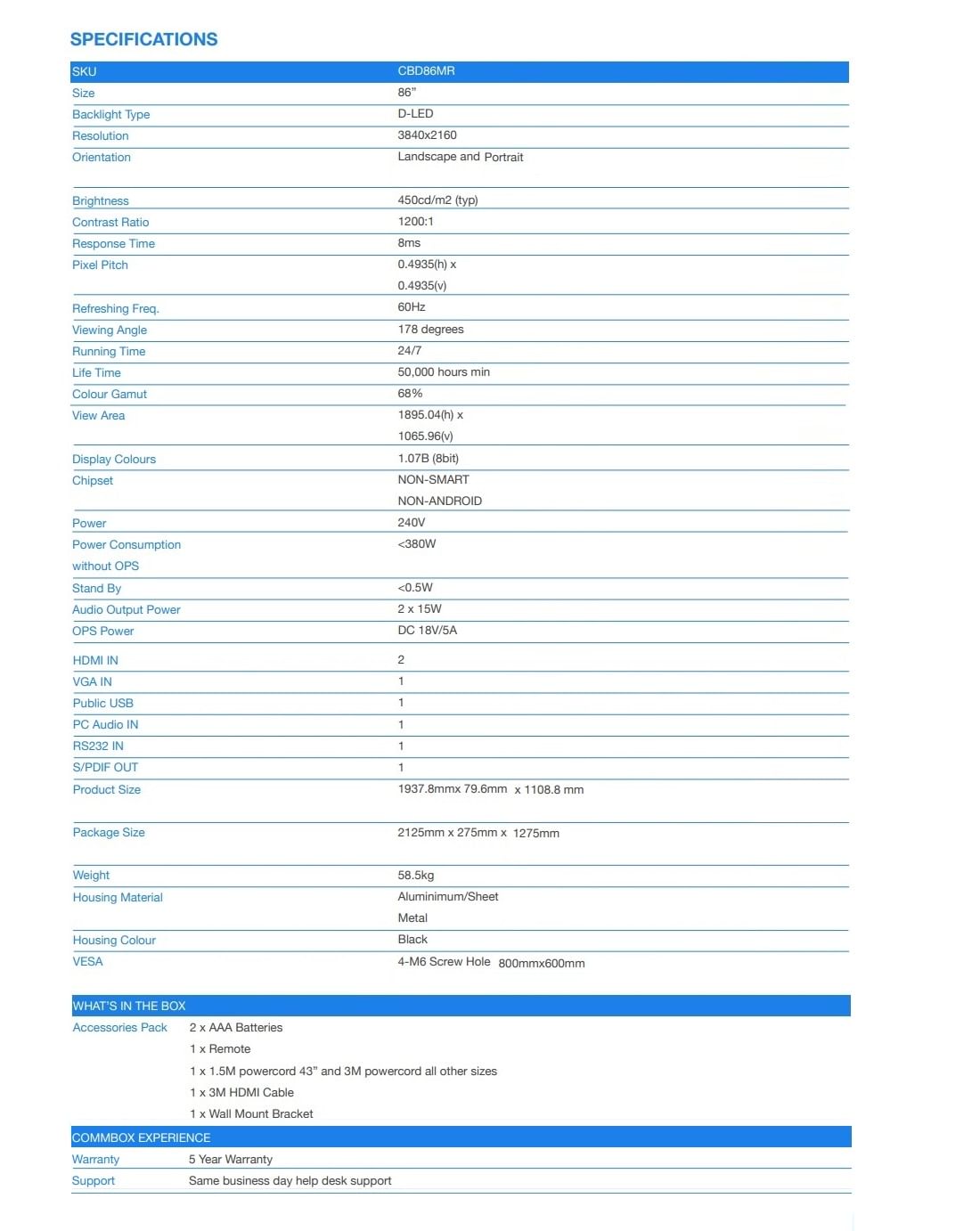
2.18 m (86")
Display technology
The technology used in the display e.g. plasma, LED.
LED
Display resolution
The number of distinct pixels in each dimension that can be displayed. It is usually quoted as width × height, with the units in pixels: for example, "1024 × 768" means the width is 1024 pixels and the height is 768 pixels. The higher the number of pixels, the sharper the image.
3840 x 2160 pixels
Display brightness
Brightness is the amount of radiating light emitted from the screen. The brightness rating is measured in candellas per square meter, commonly known as 'nits'.
450 cd/m²
HD type
Type of supported High Definition (e.g. Full HD, 4K Ultra HD).
4K Ultra HD
Touchscreen
A screen of a laptop, smartphone, etc., that responds to touch so you can control the interface using your fingers.
Response time
The response time is the time difference between the moment that a source (for example a video card) sends a signal and that equipment (for example a monitor) receives or display the signal. (Used abbreviations: R/F = Rise and Fall.)
8 ms
Contrast ratio (typical)
The difference in light intensity between the brightest white and the darkest black.
1200:1
Viewing angle, horizontal
Maximum horizontal angle at which a display can be viewed with acceptable visual performance.
178°
Viewing angle, vertical
Maximum vertical angle at which a display can be viewed with acceptable visual performance.
178°
Display number of colours
1.07 billion colours
Pixel pitch
This is the parameter of a picture tube, which specifies the shortest distance between two dots of the same colour. The principle is: the smaller the dot pitch, the better sharpness of image.
0.4935 x 0.4935 mm
Native refresh rate
60 Hz
Haze rate
25%
Ports & interfaces
HDMI ports quantity
The number of sockets (ports) for HDMI connections. HDMI (High-Definition Multimedia Interface) is a compact audio/video interface for transferring uncompressed video data and compressed/uncompressed digital audio data from a HDMI-compliant device ("the source device") to a compatible computer monitor, video projector, digital television, or digital audio device. HDMI is a digital replacement for existing analog video standards.
2
VGA (D-Sub) input ports
Sockets in the device for VGA (D-Sub) inputs, which are sockets with 15 holes. The 15-pin VGA connector is found on many video cards, computer monitors, and high definition television sets.
1
DisplayPorts quantity
Number of DisplayPorts. A DisplayPort is a digital display interface developed by the Video Electronics Standards Association (VESA). The interface is primarily used to connect a video source to a display device such as a computer monitor, though it can also be used to carry audio, USB, and other forms of data.
1
USB port
The device features a socket into which a USB cable can be plugged.
USB ports quantity
1
Audio (L/R) out
The two sockets (ports) for transmitting left audio signal (white cable) and right audio signal (red cable).
1
PC Audio in
The socket (port) for the PC audio input.
RS-232 interface
Audio
Built-in speaker(s)
The device contains speaker(s) to produce sound.
Number of built-in speakers
2
RMS rated power
RMS (Root mean square) is a measure of the continuous power required by a device, in particular audio amplifiers and loudspeakers.
30 W
Design
Product design
The creation of a plan or convention for the construction of an object or a system.
Digital signage flat panel
Placement supported
Where the product can be placed e.g. indoor/outdoor, horizontal/vertical.
Indoor
Orientation
Horizontal/Vertical
Product colour
The colour e.g. red, blue, green, black, white.
Black
Screen shape
Flat
VESA mounting
Panel mounting interface
The product can be used wih VESA mounting interfaces.
800 x 600 mm
Mounting type
Type of mounting e.g. wall mounting.
Wall
Performance
Purpose
What the product is used for.
Universal
Operating hours (hours/days)
24/7
Power
Power consumption (typical)
Amount of power consumed by this model, often expressed in watts (W). Typical values that manufacturers give are power consumption when off, standby/suspended mode, typical use, maximum usage.
380 W
Power consumption (standby)
The amount of electricity that is consumed when the product is on standby.
0.5 W
AC input voltage
The voltage of the AC electricity that is inputted into the product.
240 V
Computer system
Computer system
Built-in processor
Whether or not a processor is built into the device.
Weight & dimensions
Display width
1937.8 mm
Display depth
79.6 mm
Display height
1108.8 mm
Display weight
58.5 kg
Packaging data
Package width
The distance from one side of the packaging to the other.
2125 mm
Package depth
The distance from the front to the back of the packaging.
275 mm
Package height
The distance from the top to the bottom of the packaging.
1125 mm
Packaging content
Remote control included
Component of an electronics device, most commonly a television set, DVD player and home theater systems originally used for operating the device wirelessly from a short line-of-sight distance.
Cables included
AC, HDMI
Mounting kit
Features
Wall mountable
The product can be mounted on (attached to ) a wall.