
40% Off
(Carton Damaged) Lenovo ThinkVision E24-30 23.8" FHD IPS 100Hz Height Adjustable Monitor
Item No:
836568
MPN:
63EDMAR2AU-DB
$229.00
$139.00
While stocks last!
Payment options
Shipping Information
- Available for shipping
- Usually leaves our warehouse in 1-2 business days
Store Availability
- 2-3 business days at Bankstown Store
- 2-3 business days at Castle Hill Store
- Low Stock at Northmead Store
Shipping Estimate
PLEASE NOTE THIS ITEM IS CARTON DAMAGED. However, it does not affect the functionality of the product and it does come with the
| Display | |
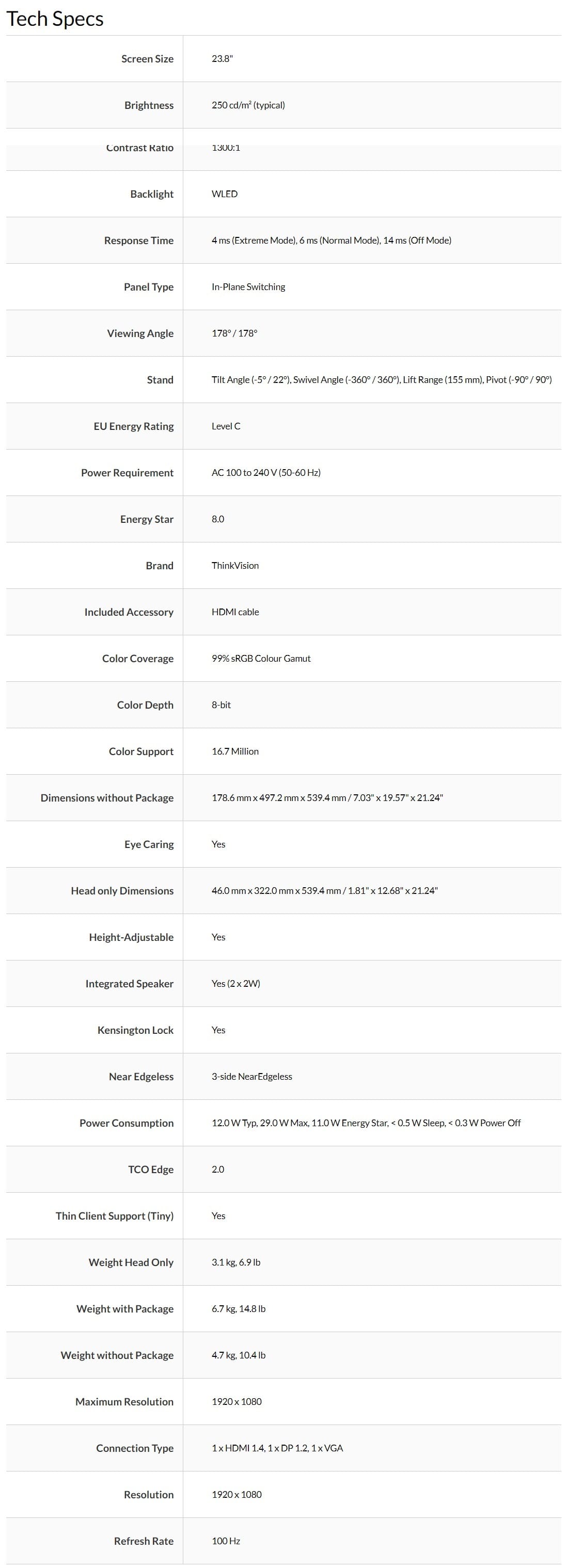
| Display diagonal Size of the display for this product, measured diagonally, usually in inches. | 60.5 cm (23.8") |
| Display resolution The number of distinct pixels in each dimension that can be displayed. It is usually quoted as width × height, with the units in pixels: for example, "1024 × 768" means the width is 1024 pixels and the height is 768 pixels. The higher the number of pixels, the sharper the image. | 1920 x 1080 pixels |
| HD type Type of supported High Definition (e.g. Full HD, 4K Ultra HD). | Full HD |
| Native aspect ratio The aspect ratio is the ratio of the width of an image to its height. The native aspect ratio is the one which the projector/display is particularly designed for. Images shown in native aspect ratio will utilize the entire resolution of the display and achieve maximum brightness. Images shown in other than native aspect ratio will always have less resolution and less brightness than images shown in native aspect ratio. | 16:9 |
| Display technology The technology used in the display e.g. plasma, LED. | LED |
| Panel type | IPS |
| LED backlight A backlight is a form of illumination used in liquid crystal displays (LCDs). One type of backlight is made by LEDs, which can be either white or RGB (red green blue). White LEDs are used most often in notebooks and desktop screens, and in virtually all mobile LCD screens. RGB LEDs for backlighting are found in high-end color proofing displays such as HP DreamColor LP2480zx monitor or selected HP EliteBook notebooks, as well as newer consumer grade displays such as Dell's Studio series laptops which have an optional RGB LED display. |
 |
| Backlight type | W-LED |
| Display brightness (typical) Display brightness, measured by its Luminance, presented as a figure in nits. Typical brightness ratings for monitors range from 250 to 350 nits with a target value of between 80 to 120 nits being suitable for most displays in a normal viewing environment. | 250 cd/m² |
| Response time The response time is the time difference between the moment that a source (for example a video card) sends a signal and that equipment (for example a monitor) receives or display the signal. (Used abbreviations: R/F = Rise and Fall.) | 6 ms |
| Anti-glare screen Always gives an optimal view, even in direct sunlight. |
|
| Screen shape | Flat |
| Contrast ratio (typical) The difference in light intensity between the brightest white and the darkest black. | 1300:1 |
| Maximum refresh rate | 100 Hz |
| Viewing angle, horizontal Maximum horizontal angle at which a display can be viewed with acceptable visual performance. | 178° |
| Viewing angle, vertical Maximum vertical angle at which a display can be viewed with acceptable visual performance. | 178° |
| Display number of colours | 16.7 million colours |
| Response time (fast) | 4 ms |
| Pixel pitch This is the parameter of a picture tube, which specifies the shortest distance between two dots of the same colour. The principle is: the smaller the dot pitch, the better sharpness of image. | 0.275 x 0.275 mm |
| Colour gamut | 99% |
| sRGB coverage (typical) | 99% |
| Performance | |
| NVIDIA G-SYNC |
 |
| AMD FreeSync The product includes AMD Freesync Technology for the dynamic synchronization of the graphic card and the monitor in order to avoid screen tearing. |
|
| Low Blue Light technology |
|
| Multimedia | |
| Built-in speaker(s) The device contains speaker(s) to produce sound. |
|
| Built-in microphone Microphone that is found inside the product. |
|
| Built-in camera The product has an integrated camera. |
|
| Design | |
| Product colour The colour e.g. red, blue, green, black, white. | Black |
| Colour name | Raven Black |
| Ports & interfaces | |
| Built-in USB hub Whether or not the device features a USB hub to connect more than one other device via USB. |
|
| USB Type-C DisplayPort Alternate Mode |
|
| USB Power Delivery (USB PD) |
|
| VGA (D-Sub) ports quantity Number of VGA (D-Sub) ports (connecting interfaces) in the device. The VGA (D-Sub) connector is a 15 pin connector between a computer and a monitor. It was first introduced in 1987 by IBM. | 1 |
| HDMI HDMI (High-Definition Multimedia Interface) is a compact audio/video interface for transferring uncompressed video data and compressed/uncompressed digital audio data from a HDMI-compliant device ("the source device") to a compatible computer monitor, video projector, digital television, or digital audio device. HDMI is a digital replacement for existing analog video standards. |
|
| HDMI ports quantity The number of sockets (ports) for HDMI connections. HDMI (High-Definition Multimedia Interface) is a compact audio/video interface for transferring uncompressed video data and compressed/uncompressed digital audio data from a HDMI-compliant device ("the source device") to a compatible computer monitor, video projector, digital television, or digital audio device. HDMI is a digital replacement for existing analog video standards. | 1 |
| HDMI version | 1.4 |
| DisplayPorts quantity Number of DisplayPorts. A DisplayPort is a digital display interface developed by the Video Electronics Standards Association (VESA). The interface is primarily used to connect a video source to a display device such as a computer monitor, though it can also be used to carry audio, USB, and other forms of data. | 1 |
| DisplayPort version | 1.2 |
| Network | |
| Ethernet LAN An Ethernet LAN (Local Area Network) interface is present, for a wired conection via a cable. |
|
| Ergonomics | |
| VESA mounting |
|
| Height adjustment The part of the device that can be adjusted to change the height. |
|
| Pivot |
|
| Tilt adjustment The tilt, which means the angle at which the device is pointing (up or down), can be changed. |
|
| Power | |
| Energy efficiency class (SDR) | C |
| Energy consumption (SDR) per 1000 hours | 12 kWh |
| Power consumption (typical) Amount of power consumed by this model, often expressed in watts (W). Typical values that manufacturers give are power consumption when off, standby/suspended mode, typical use, maximum usage. | 12 W |
| Power consumption (standby) The amount of electricity that is consumed when the product is on standby. | 0.5 W |
| Power consumption (max) The maximum amount of power used by the device. | 29 W |
| Power consumption (off) | 0.3 W |
| Power supply type The type of power supply which this product uses. | Internal |
| Energy efficiency scale | A to G |
| Weight & dimensions | |
| Width (with stand) | 539.4 mm |
| Depth (with stand) | 178.6 mm |
| Height (with stand) | 497.2 mm |
| Weight (with stand) | 4.7 kg |
| Width (without stand) | 539.4 mm |
| Depth (without stand) | 46 mm |
| Height (without stand) | 322 mm |
| Weight (without stand) | 3.1 kg |
| Bezel width (side) | 1.8 mm |
| Packaging data | |
| Package width The distance from one side of the packaging to the other. | 621 mm |
| Package depth The distance from the front to the back of the packaging. | 126 mm |
| Package height The distance from the top to the bottom of the packaging. | 385 mm |
| Package weight Weight of the packaged product. | 6.7 kg |
| Other features | |
| Certification | ENERGY STAR Certified, TCO 9.0, TCO Edge 2.0, EPEAT Gold, RoHS, EU Energy Efficiency Level (Level-C), Eyesafe Display 2.0, TÜV Low Blue Light (Hardware solution), TÜV Rheinland Low Blue Light, TÜV Rheinland Flicker Free, TÜV Rheinland Eye Comfort |
| SKU | 836568 |
| MPN | 63EDMAR2AU-DB |
| Brand | Lenovo |
| Assembled to Order | No |
| Shipping Latency | None |
| Display In Stock In Frontend | No |
| Product Condition | Damaged Box |
| Screen Size (Inches) | 23.80 Inch |
| Refresh Rate (Hz) | 100Hz |
| Screen Resolution | 1920x1080 (FHD/1080p) |
| Input | DisplayPort / DP, HDMI, VGA / D-SUB |
| Stock Availability | Available for Shipping, In Stock at Warehouse |
| Product Use | General |
| Warranty Period | 3 Years Warranty |
| Warranty Contact | https://www.lenovo.com/ |