Built to set the benchmark for RTS gaming monitors, the RL2455HM is a true testament to the belief that 'gaming is in the details. Every feature and function has been meticulously thought out to provide RTS gamers with vital visibility and command to achieve peak performance.
Teaming Up with World-Leading Legendary Players of League of Legends
BenQ continues its cooperation with legendary players of League of Legends who starting from this January represent Gambit Gaming. Alex Ich, Diamond, Darien, Genja and Edward (previously known as Gosu Pepper) – This quintet has deservedly been one of the best teams in the world. Over the years, they’ve demonstrated strong gaming performances in League of Legends tournaments worldwide, winning on BenQ’s professional gaming monitors. The Gambit players, who had barely made it out of the Intel Extreme Masters Katowice group stage, impressed everyone with their trademark aggressive play.
The Black eQualizer Gives You Total Visibility
The Black eQualizer is a new feature co-developed by BenQ and professional gamers to give gamers an unprecedented level of control and visibility. Via color engine technology, dark scenes are brightened without over-exposing white levels to retain high-quality image details. The Black eQualizer allows gamers to easily spot their enemies in critical combat, enabling them to react quickly in any situation. Don’t let poor visibility and judgment cost you the game.
New Exclusive RTS Mode Ensures You Would Play Like a Pro
During product development and testing stages, BenQ's product team fine-tune the display performance of the RL2455HM is a true testament to the belief that 'gaming is in the details. Every feature and function has been provided to RTS gamers with vital visibility and command command to achieve peak performance. What they came up with is the preset RTS mode that adjusts your monitor settings accordingly for optimum RTS gaming. Now, we offer the two modes for players options: the RTS 1 mode for StarCraft II and the RTS 2 for Dota II. The exclusive preset RTS Mode will be your ultimate secret weapon.
Customize Your Individual Viewing Preference
The Display Mode and Smart Scaling features allow you to change the monitor view to suit your liking and to simulate any in-game experience. Interchange instantly between four different screen sizes from 17", 19" and 19"W, 21.5"W, 22"W, 23"W to 24"W using the Display Mode. Or take advantage of the Smart Scaling feature and enjoy the flexibility to freely scale the screen content to any custom size. You can certainly use the two features together to get the best possible view for any application or game.
Fast 1ms GTG Response Time
Fast response time of 1ms GTG means speed without the smear for an enhanced gaming experience. Fast-moving action and dramatic transitions will be rendered smoothly without the annoying effects of smearing or ghosting. Control your gaming destiny and don’t leave it in the hands of slow display.
Other Monitor
BenQ RL2455HT
Intuitive UI for Easy Navigation
The newly designed OSD enables you to conveniently change your settings in an intuitive horizontal slide out menu display. This simplistic design makes it easier to navigate between options and settings.
Intel Extreme Masters Official Gaming Monitors
BenQ XL and RL Series are proud to be the official gaming monitor in the Intel Extreme Masters season 2011/2012.
Windows® 8 Compatible for Versatility
The RL2455HM has passed Windows® 8 certification and is fully compatible with Windows 8 color systems. Plug in the RL2455HM to your computer, and Windows 8 will recognize it instantly, making setup and connection quick and effortless.
ecoFACTS Label
ecoFACTS can tell you how eco-friendly BenQ products are!
Development of eco-friendly products, BenQ doesn't just want to comply with green regulations passively, but also to actively develop eco-friendly products!
ecoFACTS declares BenQ's greatest efforts on the replacement of hazardous substances, material selection, packaging design, energy-saving design and other aspects of the products.
Mercury-free LED-backlit display
Eco-friendly ink printing in packaging box
BFR/PVC-free casing plastics
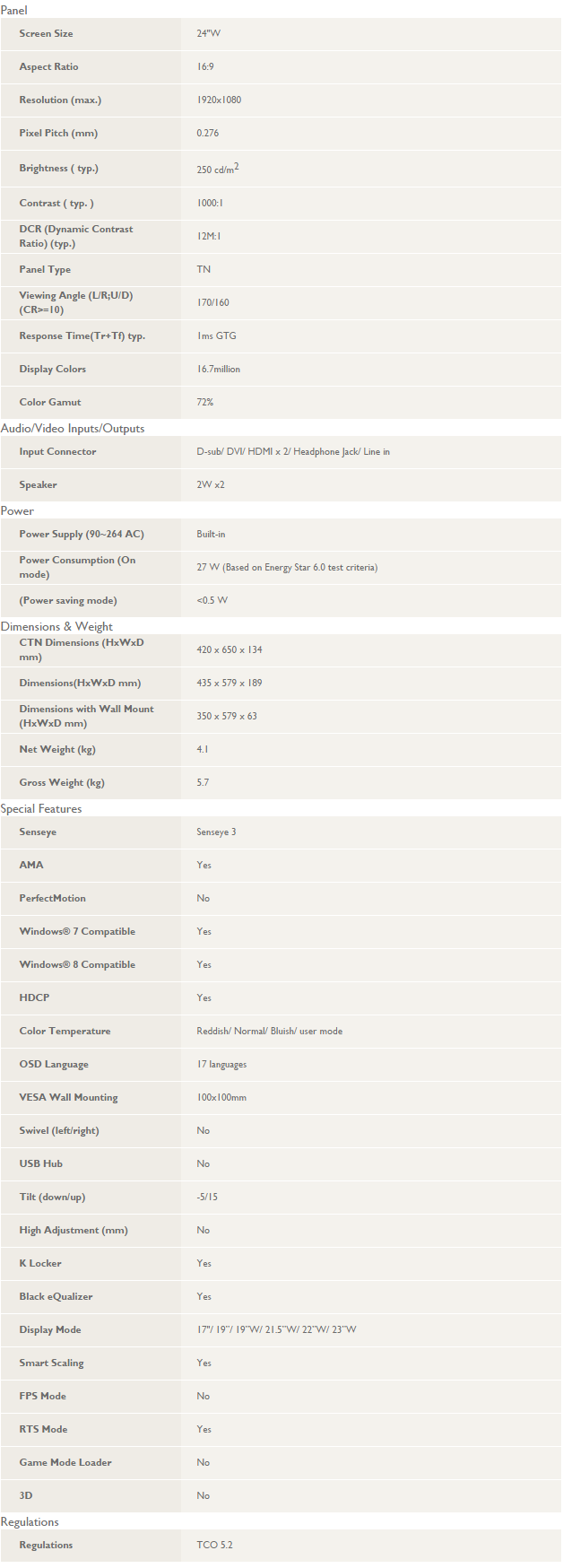
Specifications:
Display
Display diagonal
Size of the display for this product, measured diagonally, usually in inches.
61 cm (24")
Display brightness (typical)
Display brightness, measured by its Luminance, presented as a figure in candela per square meter (cd/m2). Typical brightness ratings for monitors range from 250 to 350 cd/m2 with a target value of between 80 to 120 cd/m2 being suitable for most displays in a normal viewing environment.
250 cd/m²
Display resolution
The number of distinct pixels in each dimension that can be displayed. It is usually quoted as width × height, with the units in pixels: for example, "1024 × 768" means the width is 1024 pixels and the height is 768 pixels. The higher the number of pixels, the sharper the image.
1920 x 1080 pixels
Native aspect ratio
The aspect ratio is the ratio of the width of an image to its height. The native aspect ratio is the one which the projector/display is particularly designed for. Images shown in native aspect ratio will utilize the entire resolution of the display and achieve maximum brightness. Images shown in other than native aspect ratio will always have less resolution and less brightness than images shown in native aspect ratio.
16:9
Response time
The response time is the time difference between the moment that a source (for example a video card) sends a signal and that equipment (for example a monitor) receives or display the signal. (Used abbreviations: R/F = Rise and Fall.)
1 ms
HD type
Type of supported High Definition (e.g. Full HD, 4K Ultra HD).
Full HD
Display technology
The technology used in the display e.g. plasma, LED.
LED
Supported graphics resolutions
The graphic resolutions that can be displayed by the device. The graphic resolution describes the width and height dimensions of a display, such as a computer monitor, measured in pixels.
1920 x 1080 (HD 1080)
Aspect ratio
The aspect ratio is the ratio of the width of a shape to its height. For example, 4:3 is common for standard displays and 16:9 is the ratio for Widescreen TV.
16:9
Contrast ratio (typical)
The difference in light intensity between the brightest white and the darkest black.
1000:1
Contrast ratio (dynamic)
A property of a display system, defined as the ratio of the luminance of the brightest color (white) to that of the darkest color (black) that the system is capable of producing.
12000000:1
Viewing angle, horizontal
Maximum horizontal angle at which a display can be viewed with acceptable visual performance.
170°
Viewing angle, vertical
Maximum vertical angle at which a display can be viewed with acceptable visual performance.
160°
Display number of colours
16.78 million colours
3D
The device can be used with 3D technology.
Panel type
TN+Film
Pixel pitch
This is the parameter of a picture tube, which specifies the shortest distance between two dots of the same colour. The principle is: the smaller the dot pitch, the better sharpness of image.
0.276 x 0.276 mm
Performance
Windows operating systems supported
Windows vesions wich can be used with the device.
Windows 7 Home Basic,Windows 7 Home Basic x64,Windows 7 Home Premium,Windows 7 Home Premium x64,Windows 7 Professional,Windows 7 Professional x64,Windows 7 Starter,Windows 7 Starter x64,Windows 7 Ultimate,Windows 7 Ultimate x64,Windows 8,Windows 8 Enterprise,Windows 8 Enterprise x64,Windows 8 Pro,Windows 8 Pro x64,Windows 8 x64
Multimedia
Built-in speaker(s)
The device contains speaker(s) to produce sound.
Number of speakers
The quantity of speakers included in/with the product.
2
RMS rated power
RMS (Root mean square) is a measure of the continuous power required by a device, in particular audio amplifiers and loudspeakers.
4 W
Built-in camera
The product has an integrated camera.
Design
Market positioning
Under which category can the device be positioned in the market, e.g. camera phone.
Gaming
Product colour
The colour e.g. red, blue, green, black, white.
Black, Red
Ports & interfaces
VGA (D-Sub) ports quantity
Number of VGA (D-Sub) ports (connecting interfaces) in the device. The VGA (D-Sub) connector is a 15 pin connector between a computer and a monitor. It was first introduced in 1987 by IBM.
1
DVI port
Digital Visual Interface (DVI) is a video display interface to connect a video source to a display device, such as a computer monitor.
DVI-D ports quantity
This is the amount of DVI-I interfaces. Digital Visual Interface (DVI) is a video display interface developed by the Digital Display Working Group (DDWG). The digital interface is used to connect a video source to a display device, such as a computer monitor. DVI-D means DVI digital, which means it can only support digital, but not analog.
1
HDMI ports quantity
The number of sockets (ports) for HDMI connections. HDMI (High-Definition Multimedia Interface) is a compact audio/video interface for transferring uncompressed video data and compressed/uncompressed digital audio data from a HDMI-compliant device ("the source device") to a compatible computer monitor, video projector, digital television, or digital audio device. HDMI is a digital replacement for existing analog video standards.
2
Audio input
The type of audio input that the device requires, and the connection needed.
Headphone outputs
Number of sockets /ports where headphones are connected.
1
HDCP
High-bandwidth Digital Content Protection (HDCP) is a form of digital copy protection to prevent copying of digital audio and video content as it travels across connections.
AC (power) in
Ergonomics
Panel mounting interface
The product can be used wih VESA mounting interfaces.
100 x 100 mm
Cable lock slot
Holes on the edge of devices through which a cable lock can be passed, so the device can be locked to a desk etc.
Cable lock slot type
Kensington
VESA mounting
Height adjustment
The part of the device that can be adjusted to change the height.
Tiltable
Tilt angle range
-5 - 15°
On Screen Display (OSD)
Number of OSD languages
17
Plug and Play
Indicates whether this product supports is "plug and play". Plug and play is hardware or software that, after being installed ("plugged in"), can immediately be used ("played with"), as opposed to hardware or software which requires configuration.
Thin Client
Thin client installed
The product includes a thin client, which is a computer or a computer program which depends heavily on some other computer (its server) to fulfill its computational roles. This is different from the traditional fat client, which is a computer designed to take on these roles by itself. The specific roles assumed by the server may vary, from providing data persistence (for example, for diskless nodes) to actual information processing on the client's behalf.
Power
Power consumption (typical)
Amount of power consumed by this model, often expressed in watts (W). Typical values that manufacturers give are power consumption when off, standby/suspended mode, typical use, maximum usage.
27 W
Power consumption (PowerSave)
0.5 W
AC input voltage
The voltage of the AC electricity that is inputted into the product.
96 - 264 V
AC input frequency
50 - 60 Hz
Sustainability
Sustainability certificates
ENERGY STAR
Weight & dimensions
Width (with stand)
579 mm
Depth (with stand)
189 mm
Height (with stand)
435 mm
Weight (with stand)
4.1 kg
Width (without stand)
57.9 cm
Depth (without stand)
6.3 cm
Height (without stand)
35 cm
Packaging data
Package width
The distance from one side of the packaging to the other.
650 mm
Package depth
The distance from the front to the back of the packaging.
134 mm
Package height
The distance from the top to the bottom of the packaging.
420 mm
Package weight
Weight of the packaged product.
5.7 kg
Other features
Display
The description of display that can includes display type, resolution, size etc.
LED
On/off switch
The button which is pressed to switch the device on or off.
TV tuner integrated
Device has an in-built TV tuner.