
BenQ Instashow WDC10C HDMI over Wireless Presenter with USB-C
Item No:
554029
MPN:
9H.JLD78.N3P
$2,050.87
Payment options
Shipping Information
- Unavailable for shipping
- This product is not currently available for purchase
Store Availability
- Unavailable at Bankstown Store
- Unavailable at Castle Hill Store
- Unavailable at Northmead Store
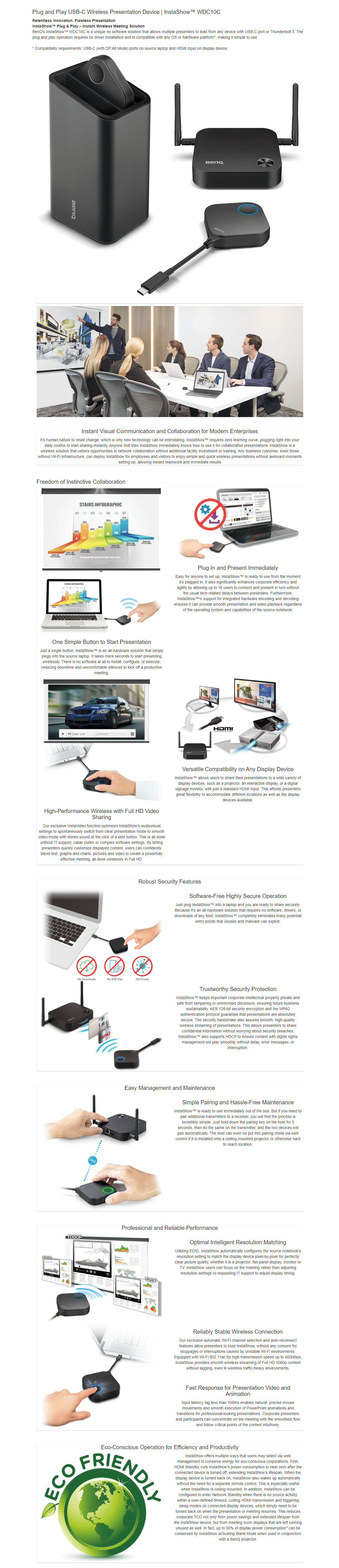
USB-C port or Thunderbolt 3 - The plug and play operation requires no driver installation - compatible with any OS or hardware platform - Includes 1 x Cradle, 1 x InstaShow Host and 2 x InstaShow Button - Compatibility requirements: USB-C (with DP Alt Mode) ports on source laptop and HDMI input on display device
| Design | |
| Form factor The shape or design of the product. | Desktop |
| Product colour The colour e.g. red, blue, green, black, white. | Black |
| LED indicators |
 |
| Features | |
| Supported graphics resolutions The graphic resolutions that can be displayed by the device. The graphic resolution describes the width and height dimensions of a display, such as a computer monitor, measured in pixels. | 800 x 600 (SVGA), 1024 x 768 (XGA), 1280 x 1024 (SXGA), 1280 x 720 (HD 720), 1280 x 768, 1280 x 800, 1280 x 960, 1360 x 768 (WXGA), 1400 x 1050 (SXGA+), 1440 x 900 (WXGA+), 1680 x 1050 (WSXGA+), 1920 x 1080 (HD 1080) |
| Supported video modes The video modes that can be displayed by the device. | 1080p |
| Maximum frame rate This is the maximum frame rate, also known as frame frequency and frames per second (FPS). It is the frequency (rate) at which an imaging device produces unique consecutive images called frames. The term applies equally well to film and video cameras, computer graphics, and motion capture systems. Frame rate is most often expressed in frames per second (FPS) and is also expressed in progressive scan monitors as hertz (Hz). | 60 fps |
| Concurrent users | 16 user(s) |
| Management features | |
| Reset button |
|
| Antenna | |
| Antenna type Type of antenna, also known an aerial, e.g. external, internal. | Internal & external |
| Network | |
| Wi-Fi standards The type of wireless local area network (LAN). It can be ad-hoc, where units in a network communicate peer-to-peer, or Infrastructure, where units communicate with each other via an access point A LAN interconnects computers in a small area e.g. home, school or office. | Wi-Fi 5 (802.11ac) |
| Wi-Fi data rate (max) | 867 Mbit/s |
| Top Wi-Fi standard Connection of this device is done via Wi-Fi in a high standard. | Wi-Fi 5 (802.11ac) |
| Frequency band A small section of the spectrum of radio communication frequencies, in which channels are usually used or set aside for the same purpose e.g.for a channel on FM radio; for mobile networks to communicate with mobile phones. | 5 GHz |
| Ethernet LAN An Ethernet LAN (Local Area Network) interface is present, for a wired conection via a cable. |
|
| Ethernet LAN data rates The different speed levels of the Ethernet LAN connection. | 10,100 Mbit/s |
| Security algorithms Security algorithms are used to provide authentication, cipher key generation, integrity and radio link privacy to users on mobile networks. The security algorithms supported are the ones that can be used with this product. | 128-bit AES, WPA2 |
| Maximum operating distance The maximum distance from which you can operate the device. | 8 m |
| Ports & interfaces | |
| Interface Interface ports to connect pieces of equipment. USB (Universal Serial Bus) has become the most popular wired interface to connect peripherals. USB 2.0 supports speeds up to 480 Mbit/s (USB 1: 12 Mbit/s). The interface FireWire is also known as the IEEE 1394 standard. Enhanced IDE (EIDE)is sometimes referred to as Fast ATA, Fast IDE or ATA-2. | USB Type-C |
| Number of HDMI outputs Port (socket) for HDMI output. | 1 |
| HDMI version | 1.4 |
| Ethernet LAN (RJ-45) ports Number of Ethernet LAN (RJ-45) ports (connecting interfaces) in the device. Ethernet LAN (RJ-45) ports allow a computer to connect to the ethernet. | 1 |
| DC-in jack The socket/plug where the DC electricity supply connects to the device. |
|
| Power | |
| Power source type What the power source is. | DC, USB |
| Input voltage The voltage (V) which is required to power the product. | 5 V |
| Power consumption (typical) Amount of power consumed by this model, often expressed in watts (W). Typical values that manufacturers give are power consumption when off, standby/suspended mode, typical use, maximum usage. | 5 W |
| System requirements | |
| Windows operating systems supported Windows vesions wich can be used with the device. |
|
| Mac compatibility Product can be used with Apple Mac software and/or hardware. |
|
| Mac operating systems supported Mac operating systems e.g. OS X can be used with the device. |
|
| Operational conditions | |
| Operating temperature (T-T) The minimum and maximum temperatures at which the product can be safely operated. | 0 - 40 °C |
| Operating relative humidity (H-H) | 10 - 80% |
| Storage temperature (T-T) The minimum and maximum temperatures at which the product can be safely stored. | -10 - 60 °C |
| Storage relative humidity (H-H) | 5 - 90% |
| Packaging content | |
| Cables included | HDMI, USB |
| Quick start guide Instructions, either online, as a computer program or in paper form, to allow you to set up and start using the product quickly. |
|
| SKU | 554029 |
| MPN | 9H.JLD78.N3P |
| Assembled to Order | No |
| Brand | BenQ |
| Shipping Latency | None |
| Display In Stock In Frontend | No |
| Product Condition | Brand New/Unused |
| Stock Availability | Available for Shipping |
| Warranty Period | 1 Year Warranty |
| Warranty Contact | https://www.benq.com/ |