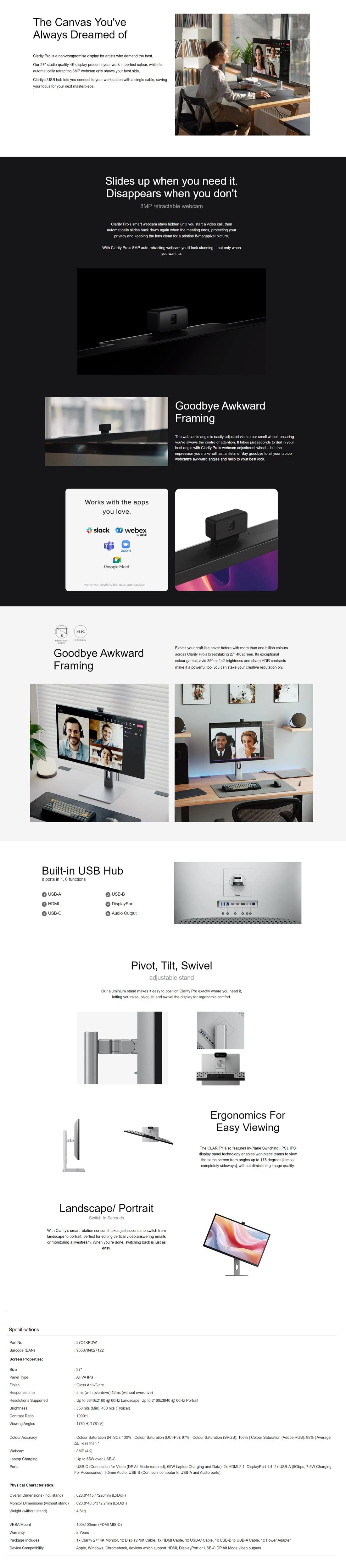
Clarity Pro’s smart webcam stays hidden until you start a video call, then automatically slides back down again when the meeting ends, protecting your privacy and keeping the lens clean for a pristine 8-megapixel picture.
With Clarity Pro’s 8MP auto-retracting webcam you’ll look stunning – but only when you want to.
Display
Display diagonal
Size of the display for this product, measured diagonally, usually in inches.
68.6 cm (27")
Display resolution
The number of distinct pixels in each dimension that can be displayed. It is usually quoted as width × height, with the units in pixels: for example, "1024 × 768" means the width is 1024 pixels and the height is 768 pixels. The higher the number of pixels, the sharper the image.
3840 x 2160 pixels
HD type
Type of supported High Definition (e.g. Full HD, 4K Ultra HD).
4K Ultra HD
Native aspect ratio
The aspect ratio is the ratio of the width of an image to its height. The native aspect ratio is the one which the projector/display is particularly designed for. Images shown in native aspect ratio will utilize the entire resolution of the display and achieve maximum brightness. Images shown in other than native aspect ratio will always have less resolution and less brightness than images shown in native aspect ratio.
16:9
Display technology
The technology used in the display e.g. plasma, LED.
LCD
Panel type
IPS
LED backlight
A backlight is a form of illumination used in liquid crystal displays (LCDs). One type of backlight is made by LEDs, which can be either white or RGB (red green blue). White LEDs are used most often in notebooks and desktop screens, and in virtually all mobile LCD screens. RGB LEDs for backlighting are found in high-end color proofing displays such as HP DreamColor LP2480zx monitor or selected HP EliteBook notebooks, as well as newer consumer grade displays such as Dell's Studio series laptops which have an optional RGB LED display.
Backlight type
QD
Touchscreen
A screen of a laptop, smartphone, etc., that responds to touch so you can control the interface using your fingers.
Display brightness (typical)
Display brightness, measured by its Luminance, presented as a figure in nits. Typical brightness ratings for monitors range from 250 to 350 nits with a target value of between 80 to 120 nits being suitable for most displays in a normal viewing environment.
400 cd/m²
Response time
The response time is the time difference between the moment that a source (for example a video card) sends a signal and that equipment (for example a monitor) receives or display the signal. (Used abbreviations: R/F = Rise and Fall.)
5 ms
Display surface
Gloss
Anti-glare screen
Always gives an optimal view, even in direct sunlight.
Screen shape
Flat
Supported graphics resolutions
The graphic resolutions that can be displayed by the device. The graphic resolution describes the width and height dimensions of a display, such as a computer monitor, measured in pixels.
3840 x 2160
Supported video modes
The video modes that can be displayed by the device.
2160p
Contrast ratio (typical)
The difference in light intensity between the brightest white and the darkest black.
1000:1
Maximum refresh rate
60 Hz
Viewing angle, horizontal
Maximum horizontal angle at which a display can be viewed with acceptable visual performance.
178°
Viewing angle, vertical
Maximum vertical angle at which a display can be viewed with acceptable visual performance.
178°
Display diagonal (metric)
This is the size of the display screen, measured diagonally.
69 cm
High Dynamic Range (HDR) supported
High Dynamic Range (HDR) technology
High Dynamic Range (HDR) 400
Colour gamut standard
Adobe RGB, DCI-P3, sRGB
sRGB coverage (typical)
100%
NTSC coverage (typical)
130%
Adobe RGB coverage
99%
DCI-P3 coverage
97%
Multimedia
Number of speakers
The quantity of speakers included in/with the product.
2
RMS rated power
RMS (Root mean square) is a measure of the continuous power required by a device, in particular audio amplifiers and loudspeakers.
10 W
Built-in speaker(s)
The device contains speaker(s) to produce sound.
Megapixel (approx.)
The number (in millions) of light-sensitive picture elements known as pixels actually used by the camera's image sensor (CCD) to record light, and which are reflected to the final number of recorded pixels stored on the memory card.
8 MP
Built-in camera
The product has an integrated camera.
Design
Market positioning
Under which category can the device be positioned in the market, e.g. camera phone.
Graphics design
Product colour
The colour e.g. red, blue, green, black, white.
Black, Silver
Housing material
What the casing of the product is made of.
HDMI
HDMI (High-Definition Multimedia Interface) is a compact audio/video interface for transferring uncompressed video data and compressed/uncompressed digital audio data from a HDMI-compliant device ("the source device") to a compatible computer monitor, video projector, digital television, or digital audio device. HDMI is a digital replacement for existing analog video standards.
HDMI ports quantity
The number of sockets (ports) for HDMI connections. HDMI (High-Definition Multimedia Interface) is a compact audio/video interface for transferring uncompressed video data and compressed/uncompressed digital audio data from a HDMI-compliant device ("the source device") to a compatible computer monitor, video projector, digital television, or digital audio device. HDMI is a digital replacement for existing analog video standards.
2
HDMI version
2.1
DisplayPorts quantity
Number of DisplayPorts. A DisplayPort is a digital display interface developed by the Video Electronics Standards Association (VESA). The interface is primarily used to connect a video source to a display device such as a computer monitor, though it can also be used to carry audio, USB, and other forms of data.
1
DisplayPort version
1.4
Audio output
The type of audio output that the device produces, and the connector(s).
Ergonomics
VESA mounting
Panel mounting interface
The product can be used wih VESA mounting interfaces.
100 x 100 mm
Wall mountable
The product can be mounted on (attached to ) a wall.
Cable management
Description of improved cable management
Height adjustment
The part of the device that can be adjusted to change the height.
Pivot
Pivot angle
0 - 90°
Swivelling
Tilt adjustment
The tilt, which means the angle at which the device is pointing (up or down), can be changed.
Power
Energy efficiency class (SDR)
F
Energy efficiency class (HDR)
G
Energy consumption (SDR) per 1000 hours
26 kWh
Energy consumption (HDR) per 1000 hours
45 kWh
Power consumption (standby)
The amount of electricity that is consumed when the product is on standby.
0.3 W
Power consumption (max)
The maximum amount of power used by the device.
150 W
AC input voltage
The voltage of the AC electricity that is inputted into the product.