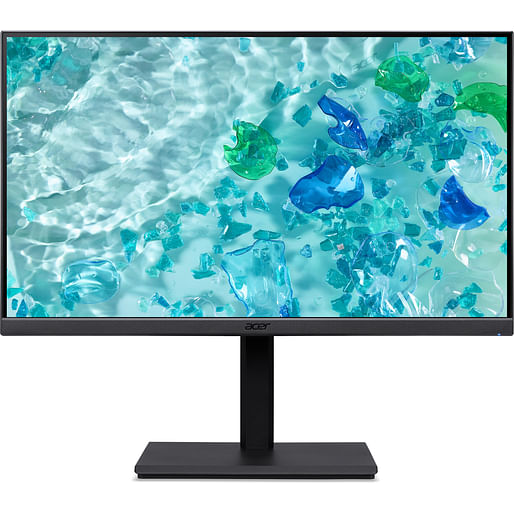
Acer Vero B7 B247YE 23.8" FHD IPS 100Hz FreeSync Monitor
Item No:
733547
MPN:
UM.QB7SA.E01
$249.00
Payment options
Shipping Information
- Unavailable for shipping
- This product is not currently available for purchase
Store Availability
- Unavailable at Bankstown Store
- Unavailable at Castle Hill Store
- Unavailable at Northmead Store
Acer B247Y E, 60.5 cm (23.8"), 1920 x 1080 pixels, Full HD, LCD, 4 ms, Black
The Acer Vero B7 series eco friendly displays enhance your work and meet your professional needs with its superior color precision and 4K UHD resolution1.
Eco friendly Viewing
This series is ENERGY STAR , TCO, and EPEAT certified, reflecting Acer's commitment to the environment. It is made with 85% PCR and 5% ocean bound plastic while using 100% recyclable paper packaging.
Absolute Immersion
Take productivity to the next level with 4K ultra high definition resolution1. Text, images, and more will be crisp and clear for a more enjoyable user experience.
Video Calls Made Easy
Make use of FHD IR webcam1 for all your Zoom calls and video conferencing needs. It also supports Windows Hello for quick and easy logins.
Flexible Adjustments
The ErgoStand1 design of this monitor allows the user to tilt, swivel, pivot, and adjust the height of your display with flexibility so you can find the best viewing angle.
Details Matter
Whether choosing photos or editing videos, the 90% DCI P3 color coverage1 with up to 1.07 billion colors1 gives you more precise colors and enhanced color depth to bring out all the details of your work.
Protecting Your Eyes
This display comes equipped with Acer VisionCare eye protecting technologies such as Acer BlueLightShield, Flickerless, Low dimming, and ComfyView.
Eco friendly Viewing
This series is ENERGY STAR , TCO, and EPEAT certified, reflecting Acer's commitment to the environment. It is made with 85% PCR and 5% ocean bound plastic while using 100% recyclable paper packaging.
Absolute Immersion
Take productivity to the next level with 4K ultra high definition resolution1. Text, images, and more will be crisp and clear for a more enjoyable user experience.
Video Calls Made Easy
Make use of FHD IR webcam1 for all your Zoom calls and video conferencing needs. It also supports Windows Hello for quick and easy logins.
Flexible Adjustments
The ErgoStand1 design of this monitor allows the user to tilt, swivel, pivot, and adjust the height of your display with flexibility so you can find the best viewing angle.
Details Matter
Whether choosing photos or editing videos, the 90% DCI P3 color coverage1 with up to 1.07 billion colors1 gives you more precise colors and enhanced color depth to bring out all the details of your work.
Protecting Your Eyes
This display comes equipped with Acer VisionCare eye protecting technologies such as Acer BlueLightShield, Flickerless, Low dimming, and ComfyView.
| Display | |
| Display diagonal Size of the display for this product, measured diagonally, usually in inches. | 60.5 cm (23.8") |
| Display resolution The number of distinct pixels in each dimension that can be displayed. It is usually quoted as width × height, with the units in pixels: for example, "1024 × 768" means the width is 1024 pixels and the height is 768 pixels. The higher the number of pixels, the sharper the image. | 1920 x 1080 pixels |
| HD type Type of supported High Definition (e.g. Full HD, 4K Ultra HD). | Full HD |
| Native aspect ratio The aspect ratio is the ratio of the width of an image to its height. The native aspect ratio is the one which the projector/display is particularly designed for. Images shown in native aspect ratio will utilize the entire resolution of the display and achieve maximum brightness. Images shown in other than native aspect ratio will always have less resolution and less brightness than images shown in native aspect ratio. | 16:9 |
| Display technology The technology used in the display e.g. plasma, LED. | LCD |
| Panel type | IPS |
| Backlight type | LED |
| Touchscreen A screen of a laptop, smartphone, etc., that responds to touch so you can control the interface using your fingers. |
 |
| Display brightness (typical) Display brightness, measured by its Luminance, presented as a figure in candela per square meter (cd/m2). Typical brightness ratings for monitors range from 250 to 350 cd/m2 with a target value of between 80 to 120 cd/m2 being suitable for most displays in a normal viewing environment. | 250 cd/m² |
| Response time The response time is the time difference between the moment that a source (for example a video card) sends a signal and that equipment (for example a monitor) receives or display the signal. (Used abbreviations: R/F = Rise and Fall.) | 4 ms |
| Screen shape | Flat |
| Contrast ratio (typical) The difference in light intensity between the brightest white and the darkest black. | 1000:1 |
| Contrast ratio (dynamic) A property of a display system, defined as the ratio of the luminance of the brightest color (white) to that of the darkest color (black) that the system is capable of producing. | 100000000:1 |
| Maximum refresh rate | 100 Hz |
| Viewing angle, horizontal Maximum horizontal angle at which a display can be viewed with acceptable visual performance. | 178° |
| Viewing angle, vertical Maximum vertical angle at which a display can be viewed with acceptable visual performance. | 178° |
| Display number of colours | 16.7 million colours |
| Pixel pitch This is the parameter of a picture tube, which specifies the shortest distance between two dots of the same colour. The principle is: the smaller the dot pitch, the better sharpness of image. | 0.28 x 0.28 mm |
| Horizontal scan range | 15 - 115 kHz |
| Vertical scan range | 48 - 120 Hz |
| Viewable size, horizontal The viewable size is often somewhat smaller than the actual size of a monitor, because there is a border around the image. | 52.7 cm |
| Viewable size, vertical | 29.6 cm |
| Colour depth | 6 bit |
| sRGB coverage (typical) | 99% |
| Performance | |
| AMD FreeSync The product includes AMD Freesync Technology for the dynamic synchronization of the graphic card and the monitor in order to avoid screen tearing. |
 |
| Multimedia | |
| Built-in speaker(s) The device contains speaker(s) to produce sound. |
|
| Built-in camera The product has an integrated camera. |
|
| Design | |
| Market positioning Under which category can the device be positioned in the market, e.g. camera phone. | Business |
| Product colour The colour e.g. red, blue, green, black, white. | Black |
| Front bezel colour | Black |
| Feet colour The colour of the feet, which are the projecting part on which a device/piece of furniture, or each of its legs, stands. | Black |
| Ports & interfaces | |
| Built-in USB hub Whether or not the device features a USB hub to connect more than one other device via USB. |
|
| VGA (D-Sub) ports quantity Number of VGA (D-Sub) ports (connecting interfaces) in the device. The VGA (D-Sub) connector is a 15 pin connector between a computer and a monitor. It was first introduced in 1987 by IBM. | 1 |
| HDMI HDMI (High-Definition Multimedia Interface) is a compact audio/video interface for transferring uncompressed video data and compressed/uncompressed digital audio data from a HDMI-compliant device ("the source device") to a compatible computer monitor, video projector, digital television, or digital audio device. HDMI is a digital replacement for existing analog video standards. |
|
| HDMI ports quantity The number of sockets (ports) for HDMI connections. HDMI (High-Definition Multimedia Interface) is a compact audio/video interface for transferring uncompressed video data and compressed/uncompressed digital audio data from a HDMI-compliant device ("the source device") to a compatible computer monitor, video projector, digital television, or digital audio device. HDMI is a digital replacement for existing analog video standards. | 1 |
| HDMI version | 1.4 |
| DisplayPorts quantity Number of DisplayPorts. A DisplayPort is a digital display interface developed by the Video Electronics Standards Association (VESA). The interface is primarily used to connect a video source to a display device such as a computer monitor, though it can also be used to carry audio, USB, and other forms of data. | 1 |
| DisplayPort version | 1.2 |
| Headphone out The socket for connecting headphones to the device. |
|
| Ergonomics | |
| VESA mounting |
|
| Panel mounting interface The product can be used wih VESA mounting interfaces. | 100 x 100 mm |
| Height adjustment | 15 cm |
| Swivelling |
|
| Swivel angle range | -30 - 30° |
| Tilt angle range | -5 - 35° |
| Tilt adjustment The tilt, which means the angle at which the device is pointing (up or down), can be changed. |
|
| Power | |
| Energy efficiency class (SDR) | Not available |
| Energy efficiency class (HDR) | Not available |
| Power consumption (typical) Amount of power consumed by this model, often expressed in watts (W). Typical values that manufacturers give are power consumption when off, standby/suspended mode, typical use, maximum usage. | 14.9 W |
| Power consumption (standby) The amount of electricity that is consumed when the product is on standby. | 0.5 W |
| Power consumption (max) The maximum amount of power used by the device. | 28 W |
| Power consumption (off) | 0.3 W |
| Packaging content | |
| Stand included |
|
| Cables included | AC, DisplayPort, HDMI |
| Weight & dimensions | |
| Width (without stand) | 540.3 mm |
| Depth (without stand) | 65.3 mm |
| Height (without stand) | 323.1 mm |
| Weight (without stand) | 3.35 kg |
| Sustainability | |
| Sustainability compliance |
|
| Sustainability certificates | TCO |
| SKU | 733547 |
| MPN | UM.QB7SA.E01 |
| Brand | Acer |
| Assembled to Order | No |
| Shipping Latency | None |
| Display In Stock In Frontend | No |
| Product Condition | Brand New/Unused |
| Screen Size (Inches) | 23.80 Inch |
| Refresh Rate (Hz) | 100Hz |
| Screen Resolution | 1920x1080 (FHD/1080p) |
| Input | DisplayPort / DP, HDMI |
| Stock Availability | Available for Shipping |
| Product Use | Business |
| Warranty Period | 3 Years Warranty |
| Warranty Contact | https://www.acer.com/ |